







How to Use AI to Analyze Student Feedback (2026 Strategy)
How to Use AI to Analyze Student Feedback
Key Takeaways
-
AI processes bulk qualitative feedback in minutes, finding sentiments effortlessly.
-
Categorizing comments by issue helps pinpoint friction quickly.
-
AI shows you how to improve an existing online course without guessing.
-
Content adjustments drive higher course completion numbers.
-
Combining automation and human empathy always creates an ideal student feedback loop.
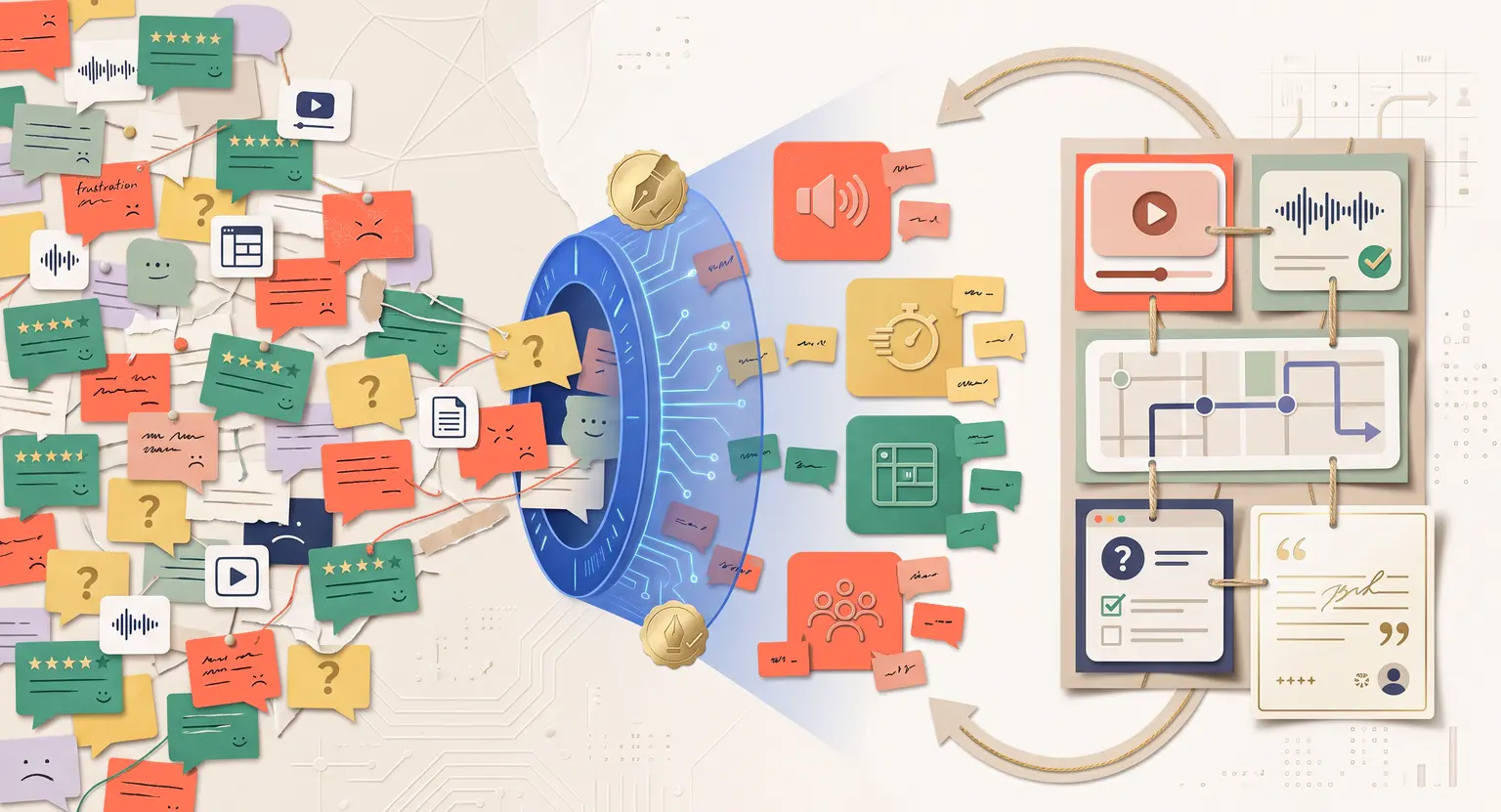
Remember the dread of opening your course dashboard after an update? You see dozens of unread comments, emails, and survey entries…
Some are glowing, some are frustrated, and many are simply confusing.
Your heart sinks. Reading this mountain of text manually feels like trying to empty a swimming pool with a spoon…
But student feedback is your most valuable asset.
It explains where people get stuck and why some quit. In 2026, parsing every sentence manually is inefficient. This is where artificial intelligence changes our daily work.
By using smart tools, you convert hours of manual reading into clear priorities. You save significant active training time and resolve issues while they are fresh.
The Trap of Manual Processing
Historically, course creators relied on simple numerical ratings - they were easy to track but lacked depth. A four-star review does not explain if module three was hard. It just gives a vague sentiment.
To understand truly, you need open-ended questions. That creates a scaling challenge. When hundreds of users write extensive ideas, basic searches fail to connect them. One student writes "the sound is terrible," another says "I cannot hear you." Standard tools miss that link.
Sorting manually also introduces bias. You focus on the loudest complaints or loudest praise, ignoring the quiet middle. AI bypasses this trap. It looks at all data objectively, helping you find exactly how to use AI to identify gaps in your online course without manual personal opinion or bias.
The Core of Sentiment Analysis
So, how does this work? It starts with natural language processing. AI does not merely find keywords; it reads the underlying mood.
Think of sentiment analysis as a helpful sorting machine. It labels each comment as positive, negative, or neutral. Modern engines go deeper, scoring sentiment from minus one to plus one.
Imagine a student writes : "I loved the community, but the portal layout is tricky."
An ordinary tool marks this neutral. AI splits it into separate tracks :
-
Positive sentiment : community experience.
-
Negative sentiment : portal usability.
This division lets you separate technical bugs from course content issues. If you build your hub on our core LearnyBox platform, managing these distinct student viewpoints becomes very smooth, enabling your team to respond to criticism instantly.
A Blueprint for Processing Feedback
Let's map out a real-world feedback workflow that you can set up today.
First, compile your text database. Pull your user interactions from survey forms, lesson comment fields, and support channels. If you have active automation, pulling from your AI for course customer support records will give you data on user struggles.
Second, feed the text to your analytical system. This can be your community forum tool or an external language model. Prompt the system to categorize the inputs clearly.
Third, analyze the thematic groups. Good models group things into categories like technical bugs, explanation pacing, or missing resources. This shows where critical bugs live.
Fourth, act and refine. Address the high-volume negative clusters immediately. You can check your general course creation checklist to align updates with your original long-term learning goals and brand requirements for student engagement.
Comparing Feedback Channels
Let's examine how AI modifies different feedback channels.
| Channel | Manual method | AI method | Core impact |
|---|---|---|---|
|
Course surveys |
Reading pages of text slowly. |
Automated semantic clustering. |
Spotting drops in engagement fast. |
|
In-lesson comments |
Browsing individual videos. |
Tagging sentiment by timestamp. |
Fixing hard lesson parts quickly. |
|
Support logs |
Manual triage by agents. |
Categorizing tickets automatically. |
Reducing customer service backlog. |
|
Lesson quizzes |
Checking correct percentages. |
Finding misinterpretation trends. |
Rewriting unclear material instantly. |
|
Community forums |
Reading active threads daily. |
Tracking discussion themes. |
Boosting learning community vibes. |
Fine-Tuning Your Curriculum
When you find the big problems, you must execute. If students note a lecture is too long, review your planning. Knowing how long your lessons should be helps you break thick videos into small, digestible chunks.
Do not just slice videos randomly. Analyze feedback to see if the topic needs a video or a simple PDF page. Sometimes, hard topics work better as quizzes than long lectures. If you are unsure, knowing how to create quizzes for online courses can refresh a difficult module.
Do not overlook production issues. If users complain about low volume, study video lessons best practices. Easy visual tweaks often resolve big problems and enhance overall learner satisfaction.
Making Marketing Assets from Praise
We often focus on negative comments to fix problems. But positive comments contain great marketing potential. When AI flags happy remarks, it gives you raw copy.
These remarks tell you what students love. Do they love the community format, the worksheets, or the bonuses?
Copy these statements for your promotional materials. When you know what users love, writing sales pages is simple. This makes learning how to get students for an online course much easier.
Using actual feedback builds trust faster than generic marketing slogans. You can feed positive remarks into writing tools to make highly relevant, beautifully targeted, and high-converting launch email campaign promotional text.
Boosting Community Experience
A positive environment depends on communication. When students feel ignored, they leave. But when they see you actioning suggestions, they stay.
Using feedback pipelines lets you modify resources based on community demands. This creates a buzzing ecosystem. Realizing how to build an online community is about active engagement, adjusting material, and responding directly to student experiences.
When students see their tips implemented, they feel valued. This building of community loyalty is completely invaluable.
Steering Clear of Common Errors
AI systems are powerful, but they require oversight. Relying only on algorithms can lead to missed context.
Sarcasm is notoriously hard for machines to spot. A student writing, "Amazing, another long worksheet!" could be sorted as highly positive.
Keep a human eye on trends. AI organizes bulk data, but you make the strategic calls. Total trust in automation is one of the biggest mistakes to avoid when creating online courses.
Use data as a guide, not a final rule. This ensures your human teaching voice remains central.
Evaluating Price and Value
Feedback reviews often highlight pricing or content value. Students might say they like your courses, but feel the scope does not match the price tag.
This is an opportunity to look at your structure. If this occurs, assessing your online course pricing strategy will help align your values with market rates.
If users want practical experience, add worksheets. If you want to improve further, studying how to create engaging course content ensures your brand delivers on its promises.
The Continuous Feedback Cycle
When you establish a pipeline, your course ceases to be static. It becomes an evolving project that improves with every cohort.
The loop is straightforward :
-
Listen : gather student reactions regularly across all touchpoints.
-
Analyze : run categorization tools to organize observations.
-
Act : revise your lesson layouts or community material.
-
Communicate : tell your community about the updates.
Telling students you fixed a module based on their notes builds strong, lasting levels of mutual trust.
Next Steps to Start Today
Setting this up does not require immense tech budgets. Begin with these steps :
-
Add simple feedback prompts at lesson ends. Ask, "What was helpful, and what was confusing?"
-
Export results regularly to plain sheets.
-
Run monthly checks to spot concerns.
Your program will grow into an automated improvement system. Start analyzing now, and let students guide your learning roadmap to success.
Frequently Asked Questions
How can I start using AI to analyze my student feedback on a low budget?
You do not need expensive specialized software to begin. You can easily export your lesson questions, survey data, or community threads into a standard CSV workbook.
Then, import this text into a modern generative AI assistant. Use a prompt like : "Group these student statements into distinct categories like lesson difficulty, pacing, or formatting issues, and summarize what is working and what is not."
This gets you eighty percent of the results immediately with zero additional software setup costs.
Can automated AI tools accurately detect sarcasm or complex emotional nuances in reviews?
AI systems have progressed significantly, but they still struggle to decode sarcasm or highly localized phrases. This is why you must avoid using automated feedback platforms blindly without human monitoring.
Do not look at individual emotional labels in isolation. Focus instead on broad analytical volume trends. If thirty reviews point to a breakdown in module three, the core issue is real, regardless of sarcasm.
Use AI to find major trouble spots, then read a small sample of comments yourself to capture raw human sentiment effectively.
Should I let my students know that I run feedback through AI?
Yes, being completely transparent about your feedback methods builds a highly respectful relationship with your audience.
You can share a friendly community post explaining : "To make sure every comment and suggestion is carefully parsed, we are using AI analysis tools to sort comments. This ensures your reviews instantly lead to course upgrades."
This transparency shows students that you value their voices enough to use cutting-edge systems so their concerns are never lost in a backed-up support inbox.
How frequently should I perform feedback analysis on my student records?
For highly active courses with weekly cohorts or rapid enrollment, running a monthly sentiment check is ideal to track ongoing bugs or immediate content issues.
If your course is smaller or self-paced, a quarterly check is sufficient. The most valuable time to run this evaluation is right after you publish a new lesson, modify your community forum, or introduce quizzes.
This helps you get reliable readings on whether changes resolved previous concerns or created fresh confusion.
Can analyzing student feedback with AI actually help me decrease refund requests?
Absolutely. Most refund requests occur because a student encounters a frustrating platform glitch or a confusing topic early in their learning.
By using AI sentiment tools to monitor community boards and survey submissions daily, you can isolate these friction points. If the system flags sudden frustration, you can resolve the issue.
Fixing these errors before they escalate into deep frustration is a highly effective way to protect your course income and boost long-term student retention.






 How to Transition From Course Sales to Recurring Revenue
 How to Sell Online Courses to Businesses (2026 Guide)
 How to Create an Irresistible Online Course Offer (2026)
 Competitor Research for Online Courses: Spot Gaps & Succeed
 How to Identify the Biggest Problems Your Online Course Should Solve