







How to Prevent Students From Sharing Paid Course Access
How to Prevent Students From Sharing Paid Course Access
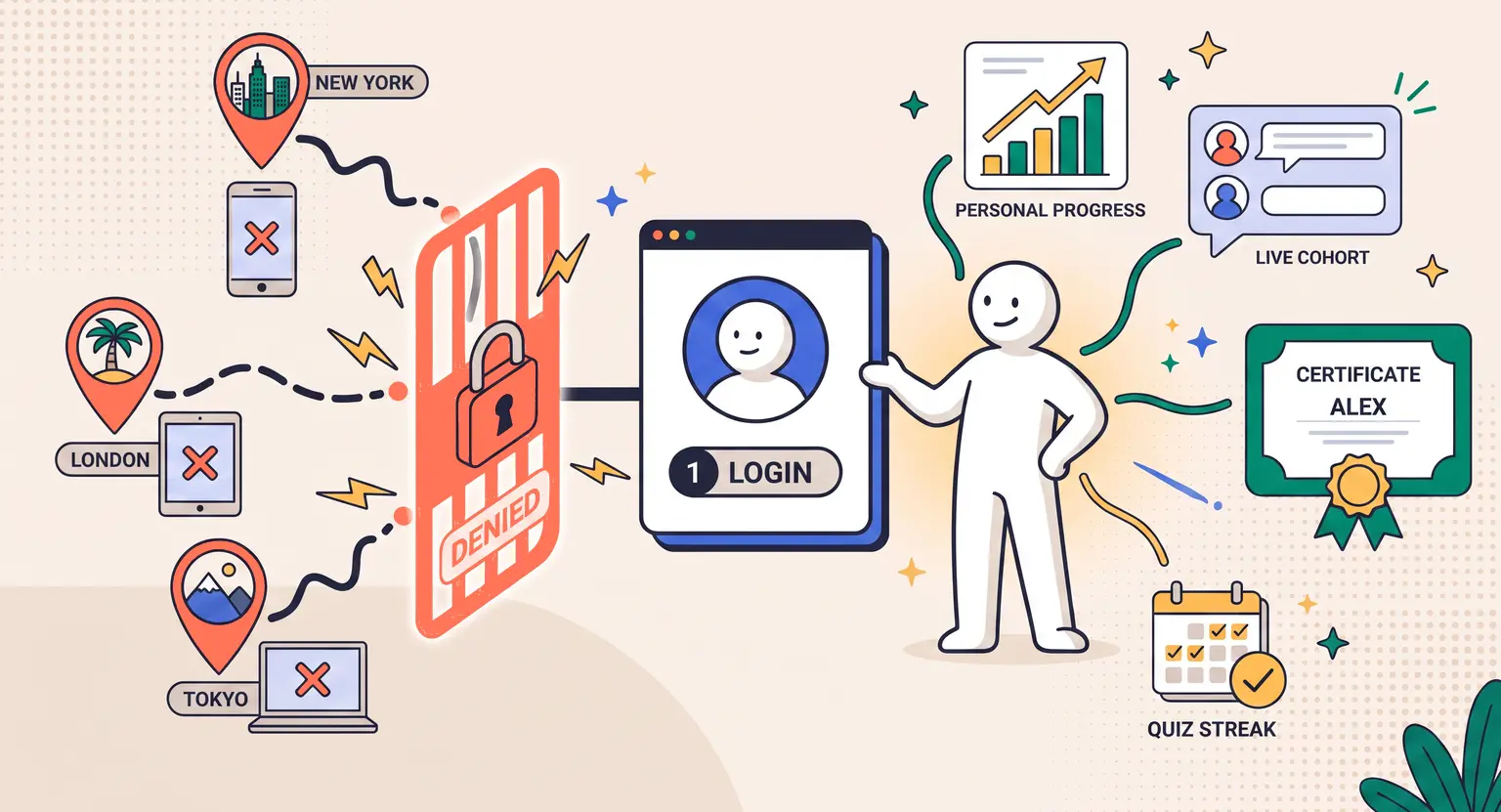
You spent months pouring your soul into creating a masterpiece : mapping out modules, filming crisp video, and building beautiful workbooks. Then, you look at your analytics. Someone has logged in from London, New York, and Tokyo within the same hour.
Ouch. Account sharing quietly kills course profit margins.
But honestly, most students sharing passwords aren't malicious. They're just trying to save a buck, unaware they're devaluing your hard work. So, how do you stop this without turning your school into a digital prison?
Quick Strategies to Stop Password Sharing
-
Enforce tech barriers : set up concurrent login limits and session timeouts on your platform.
-
Onboard properly : craft a strong student onboarding experience that builds personal investment.
-
Protect your assets : implement strategies to protect an online course from piracy naturally without hurting the user experience.
-
Value delivery : tie course progress to unique personal credentials, like personalized certificates and live cohort elements.
The Core Tech Safeguards You Need Yesterday
You cannot rely strictly on the honor system. Modern online course creators need smart technical barriers that operate in the background. The goal is blocking bad behavior without annoying paying students.
First, limit concurrent logins. This is the most effective tool in your arsenal. If a user tries to access your portal from a third device while already active, automatically log out the oldest session. Or, better yet, block the new login altogether.
Second, implement IP and device fingerprinting. Most learning management engines let you monitor where logins originate. If an account suddenly jumps between different geolocations in a matter of minutes, raise a flag.
Third, force multi-factor authentication (MFA). Nobody wants to share their personal login credentials if it means handing over access to their personal email address or SMS inbox to verify every session. MFA is a natural, highly effective deterrent that people already expect in 2026.
| Security measure | User friction level | Implementation impact |
|---|---|---|
|
Concurrent login blocker |
Low. |
Forces old sessions to close. Highly effective at stopping direct password distribution instantly. |
|
Multi-factor authentication (MFA) |
Medium. |
Excellent deterrent; highly recommended for high-ticket cohorts hosted on an all-in-one course platform. |
|
Personalized course identity |
Low. |
Ties learning progress to individual identities to protect your intellectual property as a course creator. |
Make It Socially Awkward to Share Accounts
Here is a secret : the best defense is psychology, not a complex firewall. If you make the course experience deeply personal, sharing a login becomes incredibly uncomfortable.
How do you do that? Introduce personalized profiles and community forums.
When your student portal connects directly to a forum where they post under their real name and photo, they won't hand that password over. Nobody wants their buddy posting weird comments or ruining their learning streak under their name.
We also have to talk about how password sharing impacts your metrics : your analytics turn into a mess.
You cannot gauge student success, drop-off points, or lesson quality if three people are progressing at wildly conflicting paces on the same dashboard. One is flying through the material while another is struggling. It dilutes your ability to offer high-quality updates.
Look at progress tracking, too. If you award non-transferable certificates tied to verified names, sharing becomes a liability. Students won't want someone else fast-forwarding through modules, taking quizzes, and ruining their personal dashboard analytics.
Also, look at pricing. Sometimes, people share because the barrier feels steep.
Adjusting your online course pricing strategy by offering team plans can direct sharing intent into legitimate enterprise sales. If organizations can buy five-seat bundles at a discount, they'll happily play by the rules.
The Role of Community and Gamification
Let's talk about the modern student ecosystem in 2026. Passive video libraries are dying. Interactive courses are winning.
If your training features live Q&A sessions, customized feedback, or interactive quizzes, sharing access loses its utility. When a freeloading "student" tries to get live review on their project, they won't have the profile credentials to submit their homework.
Think about it. Community groups thrive on trust. If you integrate your Slack, Discord, or LearnyBox forum so that logins are strictly mirrored, people will safeguard their passwords automatically.
They won't risk having a colleague read their confidential community posts or alter their cohort bios. Security becomes a natural byproduct of engagement, making tech rules secondary.
And you can lean on gamification. Leaderboards, digital badges, and exclusive mastermind invites make the learning journey highly personal. By forcing users to log in with a single social account to claim their badges, you build high-friction gates that naturally stop password sharing in its tracks.
Legal Guardrails and Transparent Policies
Let's face the facts. You need to clarify what is allowed and what is not. This means setting up very explicit boundaries in your terms of service.
When users sign up, let them check a box that explicitly states they own a single-user license. You must clearly establish the boundaries of copyright ownership of online courses during the purchase flow.
If you spot blatant, repetitive login sharing across multiple servers, do not immediately kick them out. Send a polite, automated email first : "Hey, we noticed logins from multiple locations. Did you give your login details to a friend? We offer group discounts if they'd like to join."
This gentle call-out often converts pirates into paying buyers. If they ignore the warning and continue, you have every right to suspend the account. Knowing how to handle copyright infringement gives you the peace of mind to act decisively when people cross the line.
Frequently Asked Questions
How do I know if my students are sharing their logins?
Look for anomalies in your student dashboard.
Watch out for multiple concurrent sessions, rapid geographic shifts in IP addresses (like logging in from different countries within minutes), or an unusually high number of completed modules in a very short span of time.
Most modern learning platforms offer automatic flagging for these exact instances.
Does stopping password sharing hurt the student experience?
It doesn't have to. If you use soft security walls like session timeout limits and concurrent session logouts, legitimate students will rarely notice.
They might occasionally have to re-enter their password when switching from their laptop to their tablet, which is standard digital behavior today.
Should I use DRM software to protect my video content?
Using digital rights management tools can prevent direct downloads, but it can be expensive and technically complex for smaller creators.
Instead, focus on restricting physical account access and building a highly interactive student community that freeloaders cannot access.
Protecting your community doesn't mean becoming an aggressive cop. It's about setting smart boundaries and treating your intellectual property with the respect it deserves.
Start with basic login limits on LearnyBox today, and watch your school profit margins quickly stabilize.






 How to Create a Course Refund Policy (Templates & Best Practices for 2026)
 How to Run a Beta Version of an Online Course (2026 Guide)
 How to Create a Cohort-Based Online Course (2026 Guide)
 How to Sell an Online Course With a Quiz Funnel (2026 Guide)
 How to Sell an Online Course Through a Sales Call (2026 Guide)