







How to Use AI to Write Course Content (2026 Guide)
How to Use AI to Write Course Content
Yes, writing an online course from scratch is a massive chore. You sit down with a blank screen, a steaming mug of coffee, and a mind that suddenly goes completely blank. It used to take weeks, or even months, just to drag your thoughts down into slides, scripts, and PDFs.
But we live in 2026, and the game has completely changed.
Artificial intelligence is no longer just a gimmick that generates robotic, repetitive paragraphs. It is your creative assistant, your structural architect, and your editor all rolled into one. And if you are not using it to speed up your production, you are leaving hours of free time on the table.
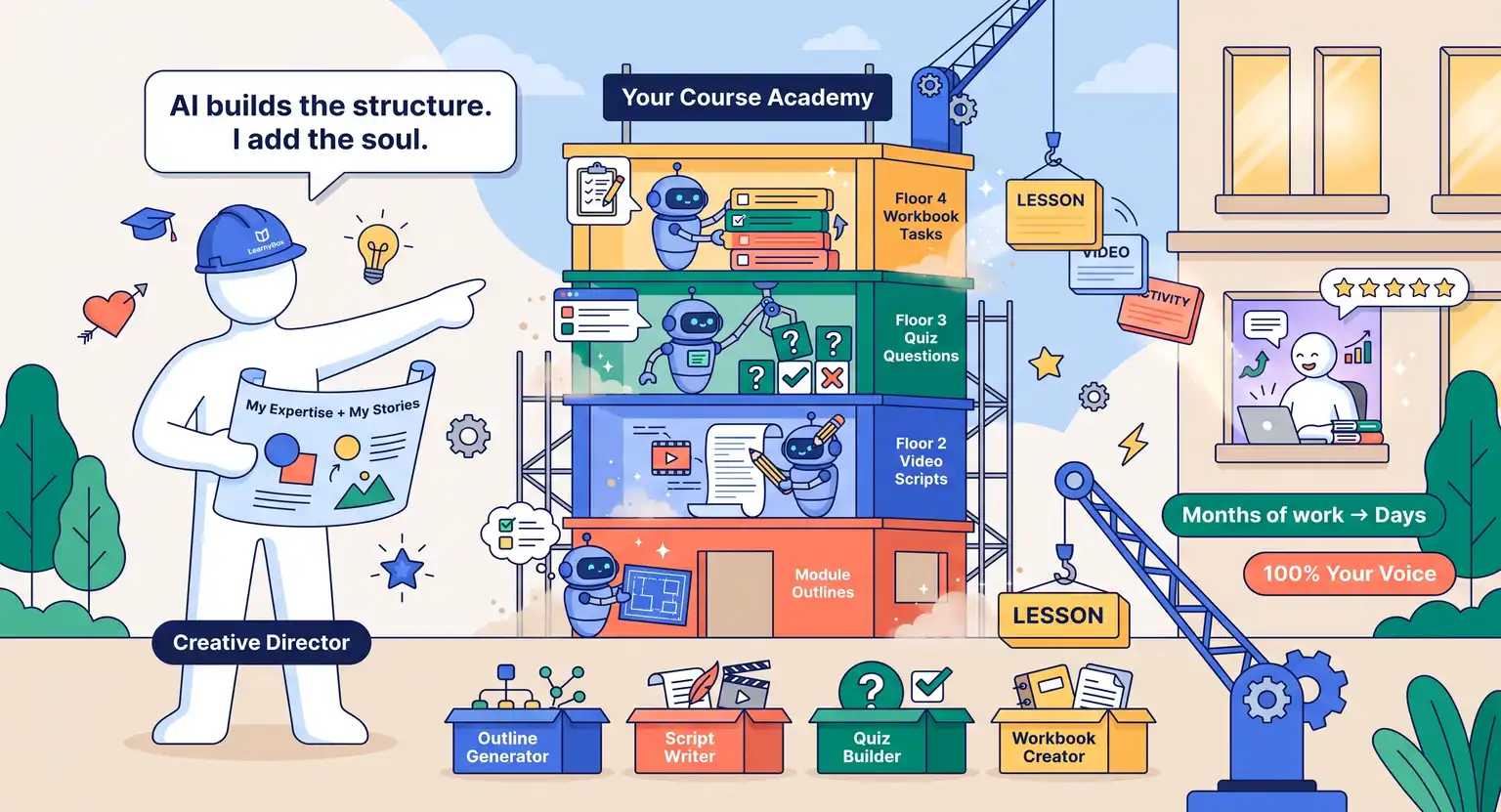
The secret is not letting the machine do all the thinking for you. If you publish raw, unedited AI generations, your students will notice the lack of substance immediately. Instead, the magic happens in a dance where you hold the compass, and the technology does the heavy hauling. Let's look at exactly how to construct an entire curriculum without losing your unique human touch.
Key Takeaways for Fast Content Creation
-
Use AI as a scaffold : never expect a tool to write your final draft instantly. Use it to build structure.
-
Bring your proprietary framework : feed the AI your frameworks, personal stories, and data before asking it to write a single paragraph.
-
Blend the formats : AI can quickly write text, outline slide decks, generate interactive quizzes, and even format workbook tasks.
-
Keep students engaged : discover how modern creators balance technology and humanity to write great material by reading our guide on how to create engaging course content.
Phase 1 : Structuring a Great Outline
Before scripting, you need a logical path. If it makes no sense, students drop off. This is where an AI course outline generator becomes your best friend.
Instead of staring at a blank whiteboard, you can tell the model who your target audience is, what problem they face, and the ultimate transformation they want… But please, do not just say "write an outline about photography." That is too generic. You need to give the engine highly specific constraints.
So, try a prompt like this :
"I am building a four-week program for intermediate real estate agents who want to master smartphone architectural photography. They know basic lighting but struggle with vertical angles and editing. Generate a module-by-module breakdown. Each week must have exactly three bite-sized lessons under ten minutes. Include practical home exercises for each module."
With this level of detail, the engine provides an extremely focused list. It gives you a backbone - you will immediately see where the gaps are. Maybe it missed a crucial lesson on software editing, or perhaps it put a complex module too early.
You are the director here. You can drag modules around, rename lessons, and refine the logical progression.
Want to save even more setup time? You can grab our tried and tested free online course outline template to build fast to pair alongside your prompt results.
By combining prebuilt structures with dynamic content suggestions, you will establish a strong foundation within minutes.
Phase 2 : Drafting Core Modules Without Losing Your Voice
Once you have a structured backbone, it is time to flesh out the lessons. The biggest trap most educators fall into here is copying and pasting raw text directly from the prompt window. That is a recipe for clinical, dry material that puts people to sleep.
Instead, think of the system as an extremely eager intern. You would not let an intern draft your public material without strict guidelines.
To write truly captivating lectures, you must feed the model your personality.
Start by using ChatGPT for course creators to build draft scripts and core reading guides. Tell the system your writing style. Are you punchy and humorous? Or are you analytical and formal?
Provide it with raw notes from your own brain first. You can easily record a quick voice memo on your phone, transcribe it, and feed that messy transcription straight into the machine.
Tell it :
"Rewrite this disorganized transcription into a clear, conversational lesson script. Use short paragraphs. Use active verbs. Keep the tone friendly and encouraging, and include my personal story about the real estate agent who made a fifty thousand dollar mistake because of a blurry thumbnail."
This guarantees your materials sound like they came from you. It keeps the core message human while saving you the exhausting process of staring at a blank screen trying to format sentences.
And do not stop at text - great courses are interactive. You can prompt the generator to draft structured PDF guides or worksheets too. It can draft action steps, interactive fill-in-the-blank exercises, or customized reflection logs.
To do this right, study the process of how to create a course workbook alongside the AI. You will build highly actionable student assets in half the usual time.
Phase 3 : Crafting Scripts for Audio and Video Lessons
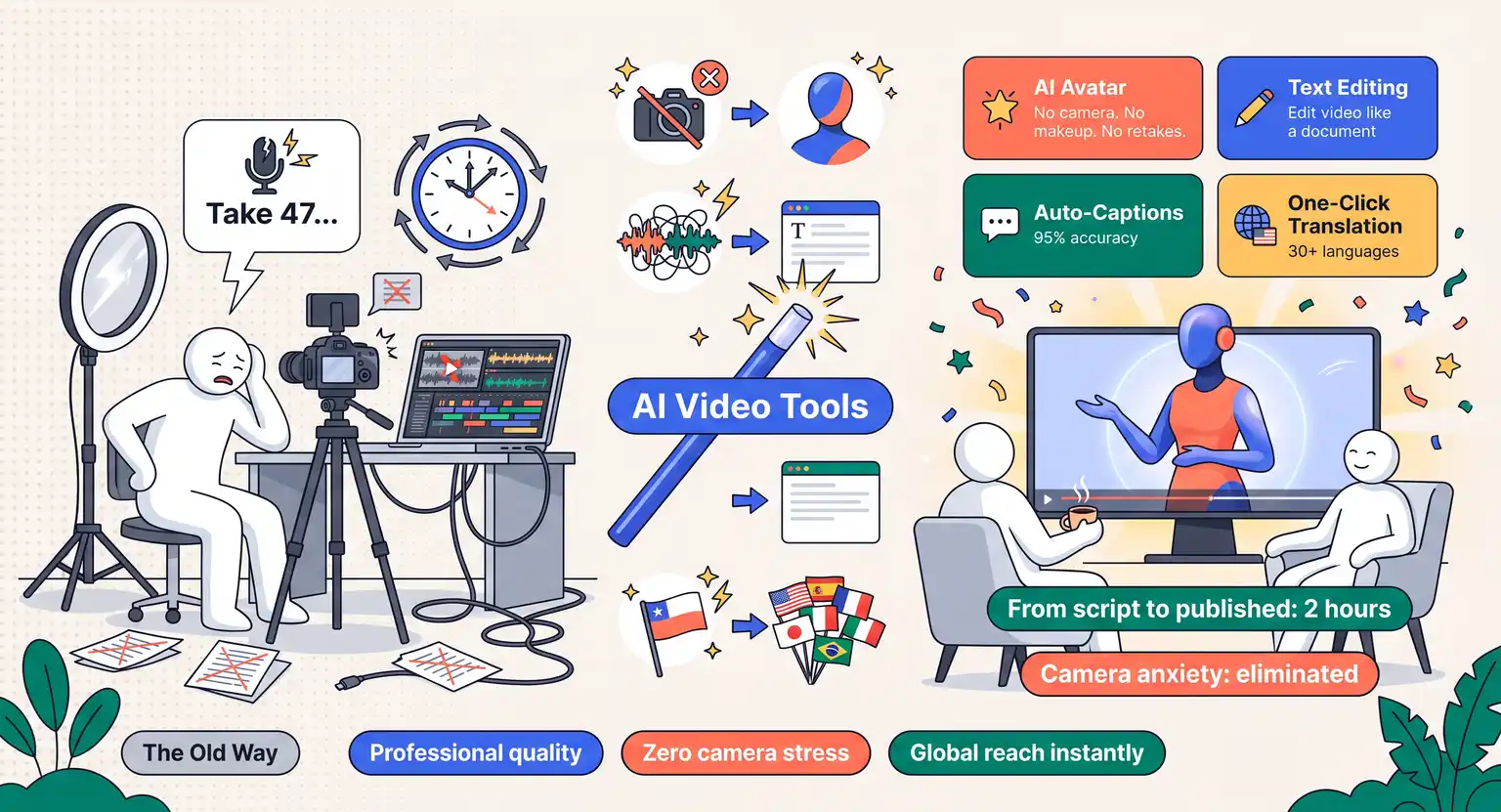
Most online students love video lessons, but filming can feel intimidating when you have to speak off the cuff. Writing full video scripts is the smart way to avoid filler words and keep lessons tight.
AI can draft your entire teleprompter script, but you have to specify the pacing. Tell the model to write in spoken language, not academic print. Spoken language uses contractions, simpler words, and shorter sentences.
But what if you do not want to record video or audio yourself?
The multimedia landscape has exploded. Integrating modern AI video tools for courses lets you generate talking head videos, clean voiceovers, or easily edit recorded videos.
So, you can use these technologies to translate raw transcripts into engaging videos with stunning visual cues.
Here is a quick checklist of things to specify in your scripting prompts :
-
Slide cues : ask the model to mark exactly when you should transition to the next visual slide.
-
Spoken emphasis : have it write words in capital letters or bold where you should naturally pause or emphasize a key term.
-
Action indicators : instruct it to include brackets with physical movements, like "[Point to the right side of the screen]."
-
Time stamps : request an estimated running time for each section to make sure you do not babble.
Choosing the Right Tools for Different Content Formats
To maximize your speed, matching the right type of asset with the right prompt strategy is critical. The table below outlines how to orchestrate this collaboration.
| Content type | What to prompt the AI for | Human's critical role | Pro tip for success |
|---|---|---|---|
|
Video scripts |
Conversational tone, slide cues, clear formatting. |
Perform a verbal read-through to trim awkward phrasing. |
Keep pacing light and conversational. |
|
Course outlines |
Bite-sized structural flow and modules. |
Rearranging lesson order to match the optimal transformation path. |
Check out how to map your academy with a how to structure an online course guide. |
|
Quizzes and tests |
Multiple-choice questions, cognitive assessments, practical scenarios. |
Validating factual answers and removing confusing double negatives. |
Include constructive feedback explanations for wrong choices. |
|
Interactive workbooks |
Self-evaluation scales, fillable exercises, checklist summaries. |
Adding real-world templates, local regulations, or niche tools. |
Make sure templates align with your core teaching model. |
|
Marketing copy |
Sales pages, email launch sequences, benefit-focused bullet points. |
Adjusting tone to appeal directly to desperate pain points. |
Match this copywriting effort with a clear online course pricing strategy to close sales. |
Phase 4 : Establishing a Semi-Automated Content Workflow
To really speed up your digital education academy, you need a systems-first mindset. Do not just use these writing tools in a chaotic, random fashion. You should build a repeatable factory line.
And this is where many modern course creators fail. They treat each prompt as a brand new conversation.
But that forces you to constantly remind the model about your target student, your tone guidelines, and the length parameters.
So, instead of repeating yourself, build a single master prompt system. Keep a document open on your computer called "My Course Bible." This should contain the essential coordinates of your digital training program.
Here is what to include inside your master document :
-
The Ideal Student Persona : their age, current frustrations, career goals, and the technical jargon they already know.
-
The Core Tone Guidelines : "Do not use academic jargon, do not use corporate filler, write at an eighth-grade reading level, and use short, active sentences."
-
Structured Formatting Codes : "Always output your scripts with visual formatting, using bold highlights for main terms and clear indicators when new concepts start."
When you sit down to write, copy and paste this master context block into your prompt interface first.
This ensures that every individual lesson, quiz, or social media promotion sequence generated fits together like beautiful puzzle pieces. It keeps the aesthetic uniform, making your digital school feel cohesive and carefully managed.
Phase 5 : The Golden Rule and the Human Polish
Let us be completely honest. The biggest error you can make when utilizing intelligence tools is pure laziness. It is easy to spot a course that was spit out by a machine in ten seconds with zero human input. It feels thin, robotic, and lacks real-world heart.
AI does not have a soul. It has no personal memories. It has never struggled to pay bills, felt the absolute high of getting a first client, or cried after a massive business failure. Those messy, real-world experiences are exactly why people buy your courses instead of reading free Wikipedia pages.
So, once the generator outputs your draft, take out your edit pen.
Go through the text and explicitly insert your human experience :
-
Personal anecdotes : add a time you messed up and the exact lessons it taught you. That vulnerability builds deep trust with your students.
-
Industry slang : natural jargon that shows you work in the trenches every single day, not just reading outdated textbook summaries.
-
Case studies : fast examples of real-world students who implemented your exact advice and saw transformative results.
-
Tone editing : scrap overly dramatic phrases like "revolutionize," "delve deeper," or "the landscape of," which generic algorithms love to repeat.
By injecting your actual human self into the skeleton the generator provides, you elevate the material from generic online babble to an authoritative, premium learning experience.
Explore Further Resources for Your Online Academy :
-
Launch your digital membership space and scale your promotional systems with LearnyBox, the complete all-in-one platform built for professional digital educators.
Taking the Leap : Build Your Course Today
The ultimate victory in the modern digital education era belongs to those who combine speed with soul.
By letting advanced models structure, format, and draft the heavy blocks of your training curriculum, you reclaim the precious time needed to serve your community deeply - let technology do the heavy lifting while you provide the essential human magic.
Start typing your prompts today and turn your expertise into a thriving commercial academy right now.
Frequently Asked Questions
Do search engines penalize AI course content?
No. Search engines prioritize helpful quality. When you actively inject real-world expertise, your pages will rank beautifully and perform perfectly for all of your visitors.
How can I protect my intellectual property?
Always adjust settings to opt out of training. This guarantees your unique core methodologies remain safe from competitors using copycat online writing tools.
Can AI write lesson quizzes?
Yes. Feed the model your scripts and ask it to output challenging multiple-choice questions with thorough explanations explaining why the answers are correct.
Will students notice the automation?
Only if you copy raw drafts directly. Customize scripts, add personal case studies, and preserve your human tone to ensure an outstanding student learning experience.








 How to Create a Course Refund Policy (Templates & Best Practices for 2026)
 How to Run a Beta Version of an Online Course (2026 Guide)
 How to Create a Cohort-Based Online Course (2026 Guide)
 How to Sell an Online Course With a Quiz Funnel (2026 Guide)
 How to Sell an Online Course Through a Sales Call (2026 Guide)