








 French
How to Host a Successful Webinar
How to Host a successful Webinar
Key Takeaways
-
Start with the outcome, not the slide deck : define one audience, one problem, and one promised result before you pick a platform or plan a single slide.
-
Choose your format intentionally : live, simulive, or on-demand each serve a different job. Plan the replay before the live event.
-
Engagement is not optional : give attendees a reason to interact every ten minutes. A webinar without participation is just a video with a chat box.
-
Measure the full funnel : show-up rate alone tells you very little. Track registrations, retention, interactions, clicks, and conversions from both live and replay viewers.
-
A good webinar has more than one life : repurpose clips, FAQs, and frameworks into emails, lead magnets, and content - and build a repeatable system so the next one costs less effort, not more.
A webinar is not just a Zoom call with a polished background. It is a scheduled moment of attention : someone has decided that your topic is worth a place in their day, and you have one chance to make that decision feel smart.
That is why learning how to host a webinar is about more than opening a room and sharing slides. You need a clear promise, the right delivery format, a friction-free registration path, a plan for interaction, and a useful next step once the session ends.
The good news? None of this requires a television studio or a giant team.
It requires intent. And a repeatable system (which is much less glamorous, but far more useful).
This guide walks you through how to host a webinar that people want to attend, stay for, and act on — whether your goal is to teach, sell, onboard customers, validate an idea, or build trust with a new audience.
Why host a webinar?
A webinar gives you something an article, sales page, or recorded video rarely can : live context. Your audience can hear how you think, ask the question they were too embarrassed to Google, and see whether your approach makes sense for them.
It is a one-to-many format with room for a real conversation. That combination is powerful.
For a course creator, coach, consultant, or online entrepreneur, webinars can support several goals at once. They can introduce a new audience to your expertise, help prospective students make a decision, answer objections before they become blockers, welcome new customers, or turn one useful lesson into weeks of reusable content.
But a webinar is not automatically valuable because it is live. A vague topic, a generic title, and fifty dense slides still make for a long hour. The value comes from relevance : one audience, one problem, one outcome that feels worth showing up for.
Start with the outcome, not the slide deck
Before you choose a webinar platform, a date, or a colour for your slides, decide what this event needs to change. What should an attendee know, believe, decide, or do differently by the end?
That answer determines everything else. A webinar designed to build awareness should make a problem feel clearer.
A sales webinar should create enough understanding and confidence for the offer to become the logical next step.
A customer onboarding session should remove friction and help people get an early win.
Be specific about the audience too. "Entrepreneurs" is not a target. "Independent nutrition coaches who have an audience but no predictable way to sell their first group programme" is much closer.
It gives you a sharper promise, better examples, and a registration page that feels written for someone rather than everyone.
If you serve several groups, do not try to squeeze them into the same session. Create a distinct webinar for each major problem. It is usually easier to fill a focused room than to rescue a broad, fuzzy message later.
Choose live, simulive, or on-demand before you plan the event
"Webinar" no longer means one thing. The format should serve the audience and the job the session needs to do — not your attachment to being live for the sake of it.
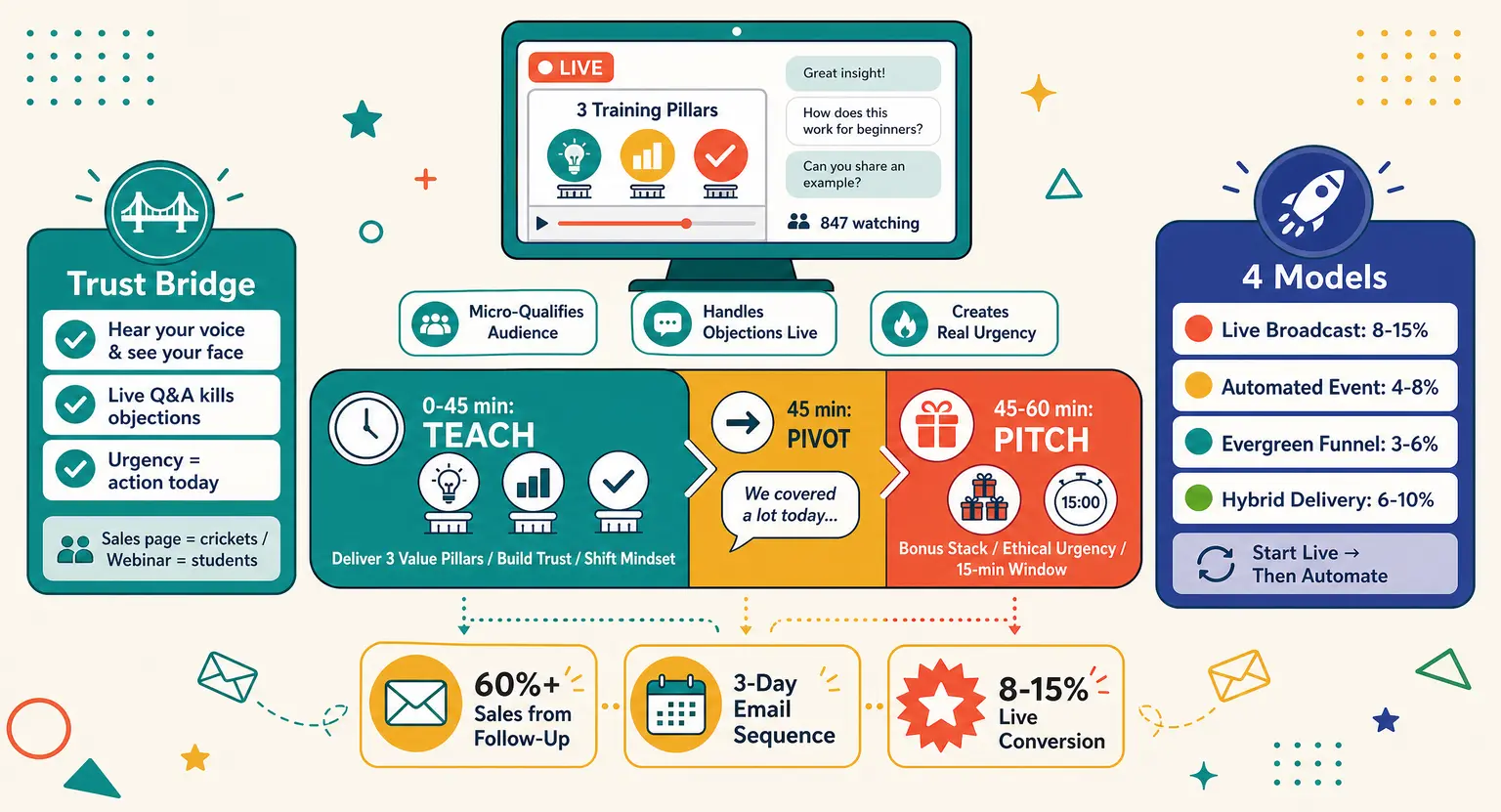
Live webinars are best when conversation is part of the value : a Q&A, a timely topic, a product reveal, a panel, an office-hours session, or an offer that benefits from addressing questions in real time.
They create urgency and warmth. They also ask more of you on the day.
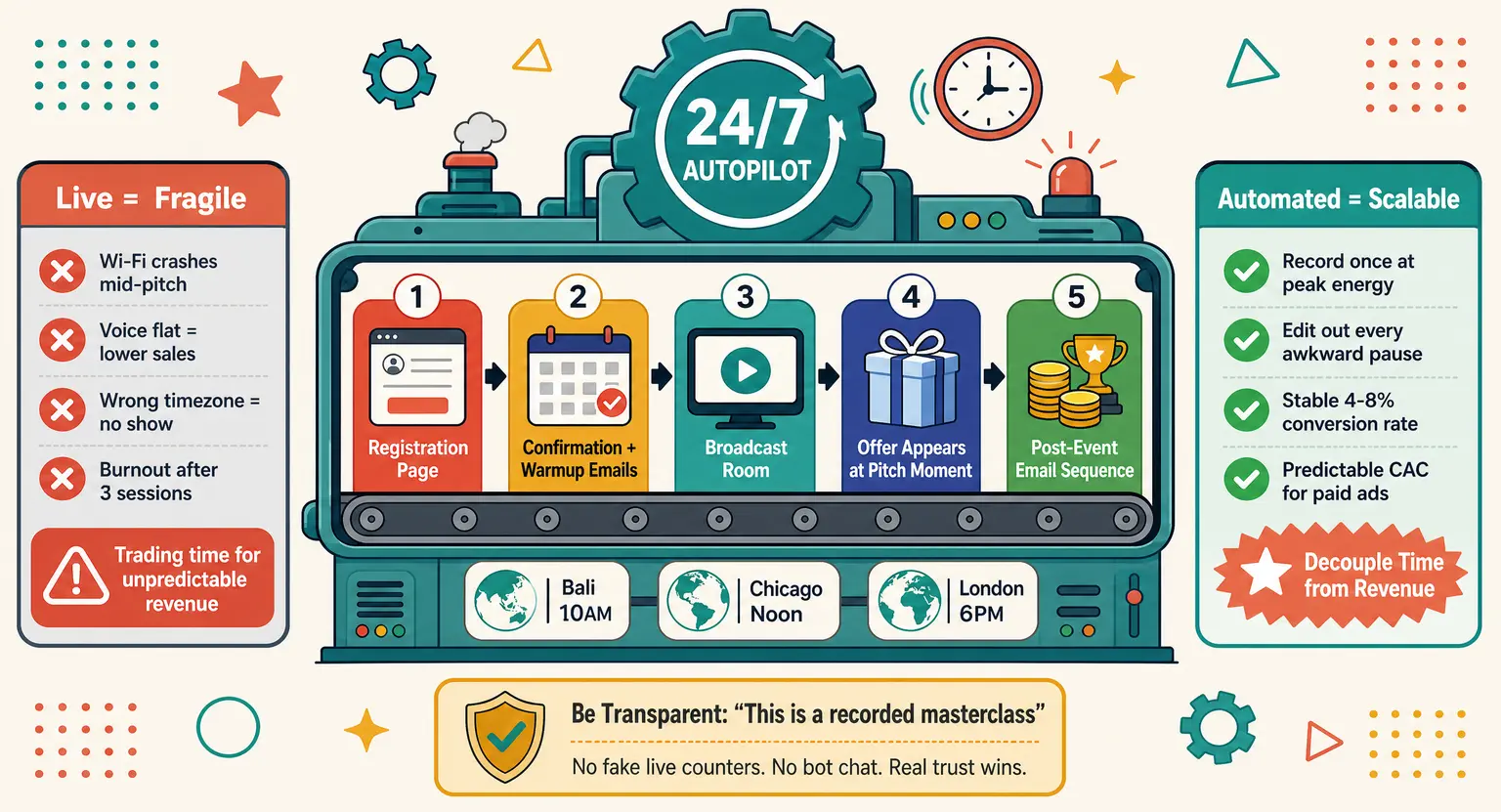
Simulive webinars are useful when you want the presentation to be polished and repeatable, but still want attendees to experience a scheduled event.
You record the core teaching in advance, then stay present in the chat, answer questions, launch polls, and handle the human part live.
It is an excellent option for a presentation that needs consistency across time zones or repeated cohorts.
On-demand webinars are not a leftover recording. They are a separate viewing experience for people who could not make the date, live in another time zone, or simply prefer to learn on their own schedule.
Give them a clear replay page, a relevant call to action, and a reason to watch now rather than "someday".
The practical rule is simple : use live interaction where it creates value; use recorded delivery where it protects quality and scale; then plan the replay from day one. A strong webinar should not disappear the moment you close the live room.
Pick a webinar format that fits the promise
There is no single perfect webinar format. There is only the format that makes your promise believable and useful.
The expert webinar teaches a practical method your audience can apply quickly. It works well when people need clarity before they need a product.
The masterclass is more structured. It makes one strong promise, walks through a framework, and gives attendees a memorable shift in perspective. This is often the best format for a flagship lead-generation webinar.
The case-study teardown takes a real result, campaign, launch, or client journey and explains what happened. It is concrete, credible, and usually more engaging than a list of generic tips.
The roundtable or panel brings several perspectives together around a focused question. Use it when the contrast between viewpoints is valuable — not just because inviting guests sounds impressive.
The product demo shows how a tool, course, or service solves a problem in practice. Keep it scenario-led. "Here is how you create your registration flow in twenty minutes" is more compelling than clicking through every menu.
The office-hours or Q&A webinar is conversational, responsive, and especially useful for customers or a warm audience. It needs less slide preparation, but it does need a host who can keep the thread when questions zigzag.
And then there is the hybrid webinar : a useful teaching segment, a practical demo or case study, and a natural invitation at the end.
For many creators, this is the sweet spot - You help first. You sell second.
No theatrical pressure required.
Build a story, not a stack of information
People do not remember every slide. They remember the moment a problem clicked into place, the example that felt uncomfortably familiar, and the next step that suddenly looked possible.
That is why every good webinar needs a narrative spine. Start with the situation your audience recognises. Name the cost of leaving it unsolved. Introduce the insight or method that changes the picture. Show it in action. Then give people a clear route forward.
This is not about turning your webinar into a dramatic film trailer. It is about making the content easy to follow. An attendee should never wonder, "Why are we talking about this now?"
Example
Imagine a webinar for coaches whose discovery calls are full but whose programmes do not sell consistently. You might open with : "If your calendar looks busy but your revenue still feels unpredictable, the problem may not be your offer. It may be the journey people take before they book."
From there, you can show the familiar pattern, explain the missing step, demonstrate your framework, and then invite attendees to use it with you.
The offer is no longer a detour. It is the answer to the problem you have just helped them see clearly.
Design for participation and accessibility from the start
In 2026, a webinar cannot feel like a recording that happens to have a chat box beside it. People expect a reason to stay present.
Plan your first interaction early - ideally within the opening five minutes. A simple poll, a "tell me where you are stuck" prompt, or a choice between two common challenges is enough. It lets people participate before they have time to drift into another tab.
Then create a rhythm. Roughly every ten minutes, break the one-way flow with a poll, a chat question, a quick decision, a resource, a live example, or a short Q&A.
You do not need to turn the session into a game show. You are simply giving people a way to think with you rather than passively watch you.
Accessibility belongs in this plan too. Offer live captions when possible, add accurate captions and a transcript to the replay, and make sure your slides can be read without squinting.
Say important information aloud rather than relying on tiny text, colour alone, or a chart that only makes sense visually. These choices help people with disabilities, non-native speakers, viewers on mobile, and anyone watching in a noisy room.
One more detail : assign a moderator if you can. While you teach, someone else can welcome attendees, surface useful questions, share links, and spot technical issues before they turn into a small fire.
Get the technical setup right without overthinking it
Technical polish matters. But it does not need to become a second full-time job.
Your audience will forgive a less-than-perfect camera much faster than they will forgive audio they cannot understand.
Start with clear sound, stable internet, front-facing light, and a background that does not compete with you - A good headset or microphone is often a smarter first upgrade than an expensive camera.
Run a proper rehearsal. Not a quick "can you hear me?" five minutes before the event - a real end-to-end test with the exact slides, videos, screen share, registration link, host controls, and calls to action you intend to use. If you have a guest, test their setup too.
Have a backup plan for the boring failures : a mobile hotspot, a copy of the slides locally saved, a second host who can take over, and a way to tell attendees what is happening if you are briefly disconnected.
You probably will not need all of it. That is the point.
Promote the outcome and build the conversion path
The best webinar in the world cannot help anyone if nobody knows why they should attend. Promotion is not an afterthought; it is the first part of the attendee experience.
Give yourself two to three weeks for a standard campaign when possible. Start with the outcome, not the agenda. "Build a webinar funnel that books qualified calls" is more tangible than "Join us for a session on webinars."
Your registration page should answer four questions quickly : who is this for, what will they leave with, why should they trust you, and what happens next?
Keep the form short. Every extra field has to earn its place.
Use your channels in different ways rather than posting the same sentence everywhere. An email can tell the fuller story,
A short social video can tease one insight,
A guest or partner can add a fresh reason to register,
And the confirmation page can immediately offer a small preparatory resource so the relationship starts before the live session.
Choose your primary call to action before you start promoting.
Is it a discovery call? A course enrolment? A free account? A product trial? You can offer a softer secondary option, but do not give people six directions at once.
A confused attendee usually does nothing.
Webinar planning checklist
-
Define one audience, one problem, one promised outcome, and one primary call to action.
-
Choose your delivery model : live, simulive, or on-demand - then plan the replay before the event takes place.
-
Use a reliable webinar platform. LearnyBox, for example, brings live and automated webinars, registration, email follow-up, and replay workflows into the same environment.
-
Prepare an opening interaction, one engagement moment for each major section, and a short list of backup Q&A questions.
-
Test audio, video, screen sharing, links, captions if available, and mobile access. Then test them once more with a second person.
-
Set up a clear run-of-show : opening, teaching, interaction points, Q&A, offer, close, and handoff to the replay or follow-up sequence.
-
Prepare your post-webinar assets before you go live : replay page, thank-you email, follow-up emails, resource links, and clips you want to create.
Measure the full funnel, not just the show-up rate
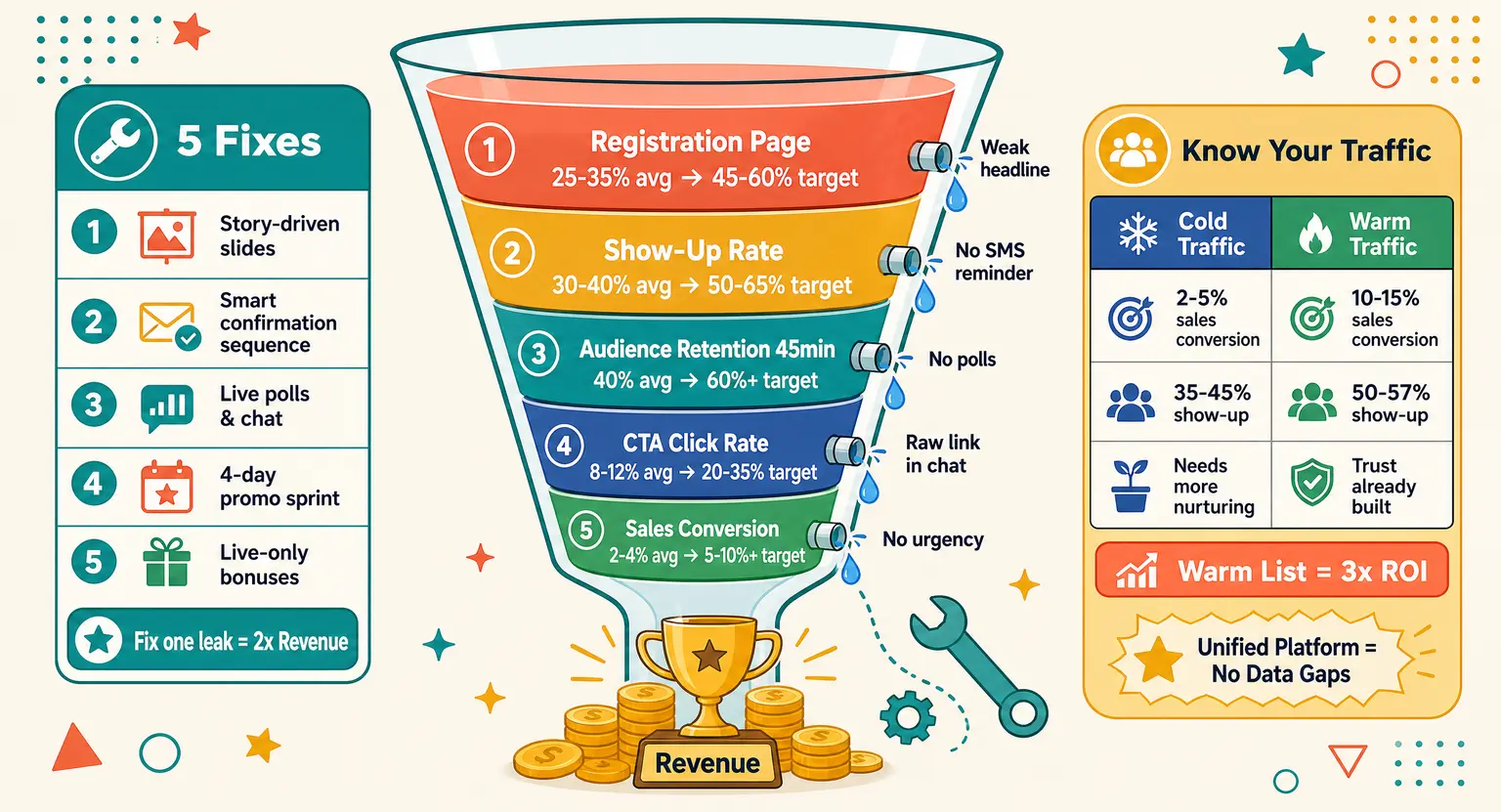
Your show-up rate still matters. It is the percentage of registrants who attend live. But treating it as the only meaningful KPI is like judging a restaurant by the number of people who walk through the door, without noticing whether anyone enjoys the meal or comes back.
Benchmark reports vary widely because audiences, industries, time zones, definitions, and formats vary widely. A 35% live attendance rate can be excellent for one list and disappointing for another. Start with your own baseline : compare your last three events, then improve one part of the journey at a time.
Track five things together : registrations to live attendees; active viewing or retention; interactions such as polls, questions, and chat; clicks on the next step; and conversions from both live and replay viewers. This tells you where the leak actually is.
If many people register but few arrive, improve the promise, timing, confirmation experience, and reminders.
If they arrive but leave early, tighten the opening and bring the useful material forward. If they stay but do not click, your offer or CTA may be too vague - or simply arrive too late.
By email
Email is usually the safest default channel for webinar reminders because it is expected, easy to manage, and easy for attendees to opt out of.
A practical sequence can include an immediate confirmation, a value-led reminder the day before, a reminder one hour before, and a short "we are live" note after the session begins.
Do not write four versions of "Don't forget!" - Give every reminder a job.
The confirmation makes the value clear and adds the calendar link,
The day-before email brings back the outcome,
The one-hour email removes friction with the join link,
The live email reminds latecomers that it is not too late.
By text message
SMS can be effective for a final nudge, especially for a warm, opted-in audience. But do not treat event registration as a blanket permission to send promotional texts.
Ask for a separate, clear opt-in where required, explain what type of message people will receive, and make it easy to stop them.
One short reminder 15 to 30 minutes before the session is usually enough. More is not always better.
A useful message feels like a service; a stream of pings feels like a doorbell nobody asked you to install.
Via WhatsApp
WhatsApp can work well for an existing, consented community, but it should be an optional channel rather than a compulsory webinar group.
Check local rules, collect the right permission, and be transparent about what attendees will receive.
If you use it, keep it valuable : a reminder, a join link, perhaps a useful prompt before the event, and a replay or resource afterward. Do not turn a webinar registration into an excuse to flood people's private messages.
Via voice message
A short voice note can add personality when your audience already knows you and has chosen that channel. It is not essential. Use it when it genuinely strengthens the relationship, not because every new channel sounds like a clever growth hack.
Host with structure, not a script
A script can make you sound like you are reading an instruction manual to a room full of people. A loose structure, on the other hand, gives you confidence without draining the life out of your delivery.
Know your opening, your transitions, the examples you cannot afford to forget, and the exact language of your call to action. Then allow yourself to respond to the room.
If a question reveals that everyone is stuck on the same point, linger there. That is not losing control; that is doing the job.
Keep your slides simple. One idea per slide. One visual that earns its place. If people are reading paragraphs, they are not listening - and you are competing with your own screen.
Look at the camera when you make an important point. Say names in the chat. Let yourself pause.
Those small cues make a webinar feel hosted rather than broadcast from behind a wall.
Keep the room involved while you are live
Ask a question early. Read a few responses aloud. Run a poll before you give the "right" answer. Invite attendees to choose between two scenarios...
These are small moves, but they turn a silent audience into a room.
Do not wait until the final ten minutes to invite questions. Seed them throughout the session, and have two or three useful questions prepared in case the chat starts quietly. People often need permission to speak first.
When it is time to present your offer, be direct and honest. Explain who it is for, what problem it solves, what changes after someone joins, and what happens next. A thoughtful offer is not an interruption if it clearly follows the teaching. It is the bridge.
And if something goes wrong? Say so, fix what you can, and keep moving. Audiences rarely remember a tiny technical wobble - They do remember whether you handled it like a human.
After the webinar, turn attention into a useful next step
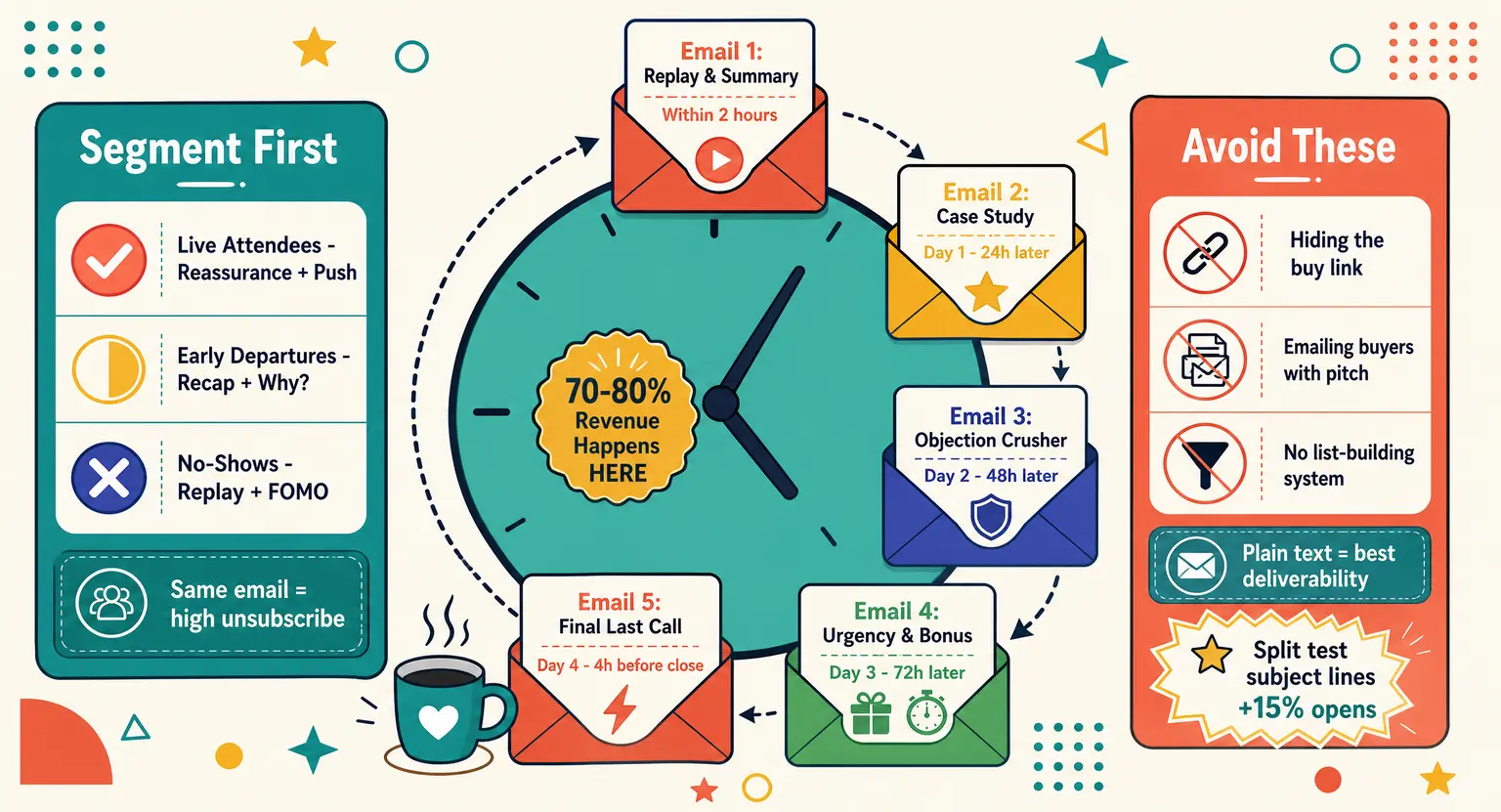
The event may be over, but the decision process is not. The first 24 hours are a strong opportunity to follow up while the topic is still fresh.
Send a concise thank-you message. Give attendees the replay, a short summary of the main insight, and one clear next step. If the replay is available, tell people how long it will remain accessible and what they will gain from watching it.
A vague "here is the recording" is easy to ignore.
Separate the experience for people who attended live and people who did not.
Live attendees may need a recap, the resource they asked for, and a relevant offer. No-shows need a reason to watch the replay : one particularly useful moment, a question answered, a result they will miss if they never press play.
If you host your webinar with LearnyBox, you can enable the replay and use the built-in email workflow to send the replay link after the session.
The point is not to automate for automation's sake. It is to make the helpful follow-up happen while you are reviewing the event rather than rebuilding the process from scratch.
Repurpose your webinar - it is a content engine
A good webinar has more than one life. The recording contains language your audience actually used, questions you did not think to answer, and teaching moments that can travel much further than one live slot.
Start by creating a clean replay with captions and chapters. Then identify three short clips built around a single useful idea, a recurring objection, or a strong before-and-after moment.
Turn the best audience questions into an FAQ, a follow-up email, or a short article. Build a downloadable checklist from the framework you taught.
AI can speed up the mechanical work here : transcription, clip suggestions, first-draft summaries, post ideas, and question clustering.
Use it as a fast assistant, not as the final editor. Watch the clips, check every claim, and keep the phrasing that sounds like you. Otherwise, your content starts to feel like it was assembled by a very enthusiastic filing cabinet.
The long-term play is simple : one well-planned webinar can support a replay, a lead magnet, an email sequence, social clips, a blog update, and even the first module of a course. That is a much better return than treating it as a one-hour performance.
Build a repeatable webinar system
Your first webinar may feel like an expedition. By the third or fourth, it should feel more like a familiar route.
Save your registration-page structure, invitation emails, reminder sequence, run-of-show, moderator checklist, slide template, follow-up emails, and reporting dashboard. After each event, note what you would keep, cut, test, or clarify next time.
Then automate the repetitive parts : registration confirmation, calendar links, reminders, replay delivery, tagging, and basic follow-up. Keep the human effort for what benefits from it - the teaching, the examples, the questions, the conversations, and the decisions that make your audience feel understood.
This is where an all-in-one workflow earns its place. With LearnyBox, you can host live or automated webinars, connect registration and follow-up, and keep the replay inside the same course-business environment rather than stitching several tools together.
The bottom line
To host a successful webinar, you do not need to be a professional presenter. You need a focused audience, a useful promise, a delivery model that fits the job, a plan for interaction, and a clear route forward after the event.
Start smaller than you think. Choose one problem you can genuinely help solve. Pick a date. Invite the right people. Rehearse. Go live - or go simulive - and learn from the room.
Then do it again, a little better.
Ready to host your first webinar?
✨ Host your first webinar with LearnyBox ✨
FAQ — How to host a webinar
What is a webinar and how does it work?
A webinar is a structured online event where a host or panel presents content to a remote audience. People usually register in advance, join through a link, and can participate through chat, polls, Q&A, downloads, or calls to action.
A webinar can be live, simulive, or on-demand. The best format depends on whether real-time interaction is central to the value you are offering.
What is the difference between a webinar and a regular video call?
A regular video call is built for conversation among a small group. A webinar is designed for a host or panel to guide a larger audience through a structured experience, with registration, reminders, engagement tools, replay access, and follow-up built around it.
Should I host a live, simulive, or on-demand webinar?
Choose live when Q&A, timeliness, or community energy matter. Choose simulive when you want a polished, repeatable presentation but still plan to be available in the chat. Choose on-demand when flexibility and long-term reach are the priority.
Many strong webinar strategies combine all three : live first, replay next, then an evergreen on-demand version.
How long should a webinar be?
For a focused expert session or demo, 30 to 45 minutes can work well. For a masterclass, training, or interactive Q&A, 45 to 60 minutes is a strong starting point. Go longer only when the subject and interaction justify it.
Whatever the duration, put your core insight and first engagement moment early. Do not make people wait forty minutes for the useful part.
What equipment do I need to host a webinar?
Start with a reliable webinar platform, clear audio, a working webcam, soft front-facing light, and stable internet with a backup connection ready. You do not need a broadcast studio. You do need a full rehearsal of audio, video, screen share, links, and your host controls.
What makes a webinar engaging?
A clear promise, a useful opening, and participation throughout the session. Use polls, chat prompts, questions, examples, downloads, and live Q&A at meaningful moments. A good rule of thumb is to give attendees a reason to respond every ten minutes or so.
What is a good webinar show-up rate?
There is no universal number. Industry benchmarks differ significantly depending on audience, topic, time zone, list quality, and whether viewers are counted live or on-demand. Track your own recent webinars first, then aim to improve your baseline through a clearer promise, better timing, and relevant reminders.
How do I improve webinar attendance without over-messaging people?
Start with a strong confirmation email, a calendar link, a useful day-before reminder, a one-hour reminder, and a short live-start message. Use SMS, WhatsApp, or other direct messages only where attendees have specifically opted in and where your local rules allow it.
What should I do after a webinar?
Send the replay quickly, share the main takeaway, and give people one clear next step. Then review attendance, retention, interactions, clicks, and conversions. Use the recording to create short clips, FAQs, follow-up emails, and an on-demand asset that keeps working after the live event.
Which platform should I use to host a webinar?
Look for a platform that can support the complete journey : registration, live or automated delivery, interaction, replay access, reminders, follow-up, and measurement. The fewer manual handoffs you create, the easier it is to improve the experience.
LearnyBox lets course creators and online entrepreneurs host live and automated webinars, connect registration and follow-up, and keep the replay workflow inside one platform.


 How to Create a Course Refund Policy (Templates & Best Practices for 2026)
 How to Run a Beta Version of an Online Course (2026 Guide)
 How to Create a Cohort-Based Online Course (2026 Guide)
 How to Sell an Online Course With a Quiz Funnel (2026 Guide)
 How to Sell an Online Course Through a Sales Call (2026 Guide)