







SCORM vs xAPI: What's the Difference for Online Courses? (2026 Guide)
SCORM vs xAPI : What's the Difference for Online Courses?
If you have spent five minutes looking into elearning standards, you have probably run into these two terms : SCORM and xAPI.
They sound like complex military acronyms or jargon meant to scare off everyday course creators. But they are actually just two different ways to solve the same problem. How does your online course talk to your platform?
If you build a beautiful course, you want to know when a student finishes it. You need to know if they passed the final test. You want to see how much time they spent on a video.
Without some kind of standard, your course content and your learning platform would speak different languages, and nothing would work.
So, today we are breaking down the wall of technical jargon. Let's look at what these standards actually do and how they differ. Most importantly, we will help you figure out which one you need for your own digital products.
Key Takeaways
Before we get into the technical details, here is a quick overview :
-
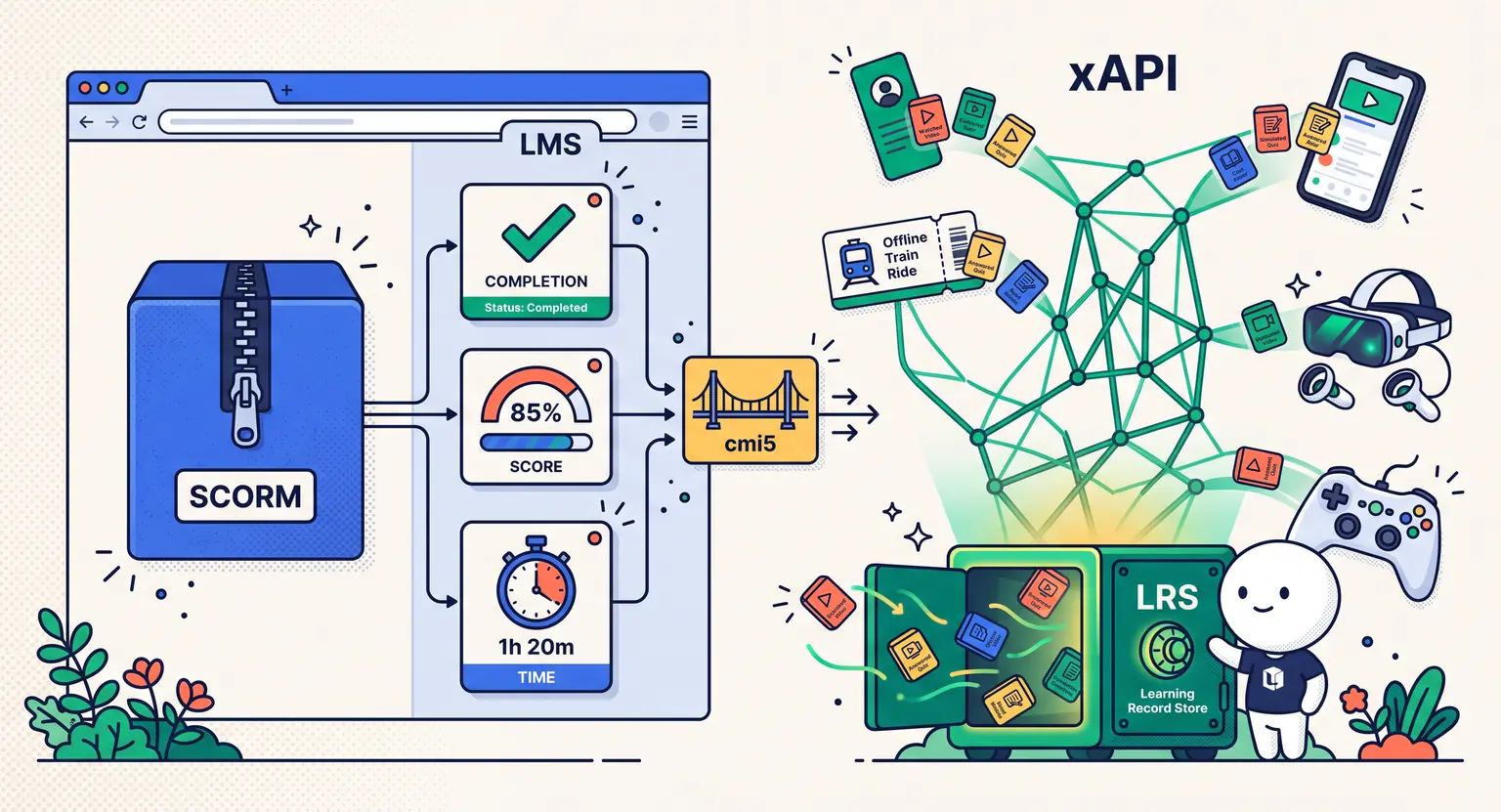
SCORM is the older, tried-and-true industry standard. It tracks simple events like completions, test scores, and total time spent. It only works when a student is online and logged into your platform.
-
xAPI is the modern, highly flexible successor. It tracks almost anything, including mobile app interactions, offline activities, games, and real-world training, using simple statement structures.
-
If you just want to launch standard, structured lessons, SCORM is often easiest. But if you want a deeply customized learning ecosystem, xAPI is the way to go.
-
No matter what you choose, finding the right hosting environment is key. Make sure to check out the best online course platforms to see which systems support these features.
What on Earth is SCORM?
SCORM stands for Shareable Content Object Reference Model. But you do not need to memorize that. Honestly, nobody does.
It was created way back in 2001 by the US Department of Defense to make elearning content reusable across different systems.
Think of it like a USB plug. Because of the USB standard, you can plug your mouse into any computer, and it works. SCORM does the same for courses.
When you build a course in an authoring tool, you export it as a SCORM package, which is basically a ZIP file. Inside that ZIP is a file called a manifest that tells your Learning Management System (LMS) how to run the course.
For a deeper look at this process, you can read our guide on what is SCORM and do course creators need it.
But because SCORM is older, it has some clear boundaries :
-
It only works inside a web browser.
-
It requires a constant internet connection to talk to the LMS.
-
It only tracks basic metrics like page clicks, test scores, and completion.
You should also know that SCORM comes in two major flavors. SCORM 1.2 is the most widely supported version across the globe, tracking basic pass or fail states. Then you have SCORM 2004, which introduced much more complex sequencing, allowing creators to build custom learning paths.
Because SCORM 2004 is far trickier to implement properly, many creators still stick to the robust 1.2 version today, which is extremely understandable.
Enter xAPI : The Modern Experience Tracker
As the internet evolved, learning did too. People stopped sitting in front of desktop computers for hours. Instead, they started learning on mobile apps, watching educational videos on commute trains, and doing virtual reality simulations.
SCORM simply could not handle this new world. So, in 2013, the Experience API was born, commonly called xAPI (or Tin Can).
Instead of forcing students into a rigid browser window, xAPI tracks learning experiences wherever they happen. It does this by using simple, three-part statements : Actor, Verb, Object.
For example :
-
Sarah completed the safety video.
-
David answered question four incorrectly.
-
Elena finished the VR simulation.
These statements do not stay trapped in an LMS. Instead, they are sent to a separate database called a Learning Record Store (LRS). An LRS can live inside your course platform or operate as a completely independent tool. It acts as a massive drawer for all kinds of data points.
This makes it incredibly easy to gather data from mobile devices, offline events, games, or even physical machinery. And because it does not require a constant browser connection, students can learn offline and sync their progress later.
We cannot talk about this debate without mentioning cmi5. Think of cmi5 as the ultimate bridge between these two. It is a set of rules that lets you use the massive tracking power of xAPI but packages your course content with the neat, predictable launch rules of SCORM.
It is the modern gold standard for creators who want the rich data of xAPI while keeping the standardized ease of SCORM, making your elearning system entirely future-proof and highly adaptable as you grow.
SCORM vs xAPI : The Head-to-Head Comparison
To make things simple, let's look at how these two standards match up across several critical categories.
| Feature | SCORM | xAPI |
|---|---|---|
|
Tracking environment |
Web browser inside an LMS only. |
Anywhere (apps, offline, VR, games, physical events). |
|
Data storage |
LMS database. |
Learning Record Store (LRS). |
|
Tracking detail |
Basic : completion, time, and final test score. |
Highly detailed : button clicks, individual answers, actions. |
|
Internet connection |
Requires a constant online connection. |
Supports offline tracking with automatic syncing. |
|
Set-up complexity |
Relatively easy and widely supported. |
Higher technical curve; needs an LRS setup. |
Let's talk about tracking details
If you want to create quizzes for online courses, SCORM will tell you if a student passed or failed. But xAPI can go much deeper.
It can tell you how many seconds they hovered over a wrong option, which specific distractors they chose, and whether they changed their mind before submitting. This level of detail helps you refine your content over time.
What about offline and mobile access?
We live in a mobile-first world. People like to learn on the go.
If a student loses internet connection in a subway while taking a SCORM course, their progress is often completely lost. But with xAPI, the mobile app stores the data offline and safely syncs it once they are back online. It is a much smoother experience.
System architecture and LRS
SCORM needs to run inside your LMS, while xAPI is much more open. It communicates with an LRS via simple web requests. So, if you want your learning data to communicate with other corporate databases, xAPI makes it relatively simple to connect systems.
Which One is Right for Your Business?
Now for the million-dollar question : which standard should you actually use? It is easy to assume that newer is always better. But that is not always the case in the elearning industry. The right option depends on your technical comfort, your goals, and your platform.
Choose SCORM if :
-
You are creating traditional, slide-based online courses.
-
You only need simple metrics like whether a student finished the course and what score they got on the quiz.
-
You want your content to work out of the box on virtually any learning platform without extra integrations.
-
You want a straightforward setup process that does not require hiring specialized web developers.
Choose xAPI if :
-
You want to track learning that happens outside of a browser, such as on a native mobile app or in physical training sessions.
-
You need to gather deep, rich analytics on how learners interact with specific interactive objects, video sections, or simulations.
-
You want to build gamified elements or complex scenarios that track multiple variables simultaneously.
-
You are aiming to sell courses to large enterprise clients who demand their own custom LRS integration.
Regardless of your choice, setting up a proper onboarding flow is highly beneficial. Taking the time to design an online course student onboarding experience can significantly boost completion rates, whether you are tracking their progress through simple SCORM packages or advanced xAPI statements.
Deciding on the Perfect Setup for Your Academy
At the end of the day, do not let these technical acronyms paralyze your progress. The primary goal is always to create engaging course content that actually helps your students achieve their goals. If you are just starting out, there is absolutely nothing wrong with sticking entirely to standard modern web lessons.
If you are ready to build a highly scalable online academy, utilizing an all-in-one platform to sell online courses can simplify everything. This leaves you with far more free time to focus on marketing and finding ways to make money with online courses successfully without stress.
Frequently Asked Questions
Is xAPI fully replacing SCORM?
No, not at all. While xAPI is much more modern and powerful, SCORM remains the undisputed standard for traditional corporate elearning and online course platforms due to its simplicity.
Can I use both SCORM and xAPI together?
Yes, absolutely. Many online course systems and enterprise setups support both standards.
You can run simple compliance lessons as SCORM packages while using xAPI to track experiential learning activities like simulations.
Do I need to know how to code to use xAPI?
Fortunately, you do not.
Modern course authoring tools allow you to design interactive modules and export them as xAPI-compliant packages automatically, handling the complex code behind the scenes.




 How to Run a Beta Version of an Online Course (2026 Guide)
 How to Create a Cohort-Based Online Course (2026 Guide)
 How to Sell an Online Course With a Quiz Funnel (2026 Guide)
 How to Sell an Online Course Through a Sales Call (2026 Guide)