







How to Build a Customer Education Program With Online Courses (2026)
How to Build a Customer Education Program With Online Courses
Think about the last time you signed up for a sophisticated software platform or bought a complex service.
Did you want to read 75 pages of dry technical documentation? Or did you want someone to quickly show you how to get your first win in under ten minutes?
Most customers want the fast path to value. Yet companies still rely heavily on reactive help desks, repetitive 1-on-1 Zoom demos, and static knowledge base articles that nobody reads until something goes wrong.
When users do not understand how to get value out of your product, they stop logging in. Then they cancel their subscription. Building a dedicated customer education program using structured online courses solves this exact problem by turning product confusion into user confidence.
Key Takeaways : Customer Education in 2026
-
Customer education transforms product onboarding from a manual support burden into an automated, self-paced growth engine.
-
Short micro-learning modules beat monolithic hour-long webinars every single time.
-
Structuring your training around specific user outcomes requires mastering how to structure online course curriculum effectively.
-
Proactive academies directly impact Net Revenue Retention (NRR) by slashing early churn and driving account expansions.
What Customer Education Actually Is (and Why Help Desks Are Not Enough)
Customer education is the systematic process of teaching your customers how to successfully use, adopt, and maximize the value of your product or service. It is not just troubleshooting bugs. It is about building product fluency.
A standard help center answers the question : "Where is this button and why is it broken?" A customer education academy answers the far more valuable question : "How do I use this workflow to achieve my core business goals faster?"
There is a massive psychological difference between those two experiences. Help docs are passive and reactive. Online learning tracks are active and intentional.
By guiding users through progressive milestones, you eliminate the cognitive overload that kills customer retention during the first thirty days.
When you provide structured training paths, your customer success managers spend less time acting as human user manuals and more time helping accounts expand their strategic operations.
The 4 Pillars of an Effective Customer Academy
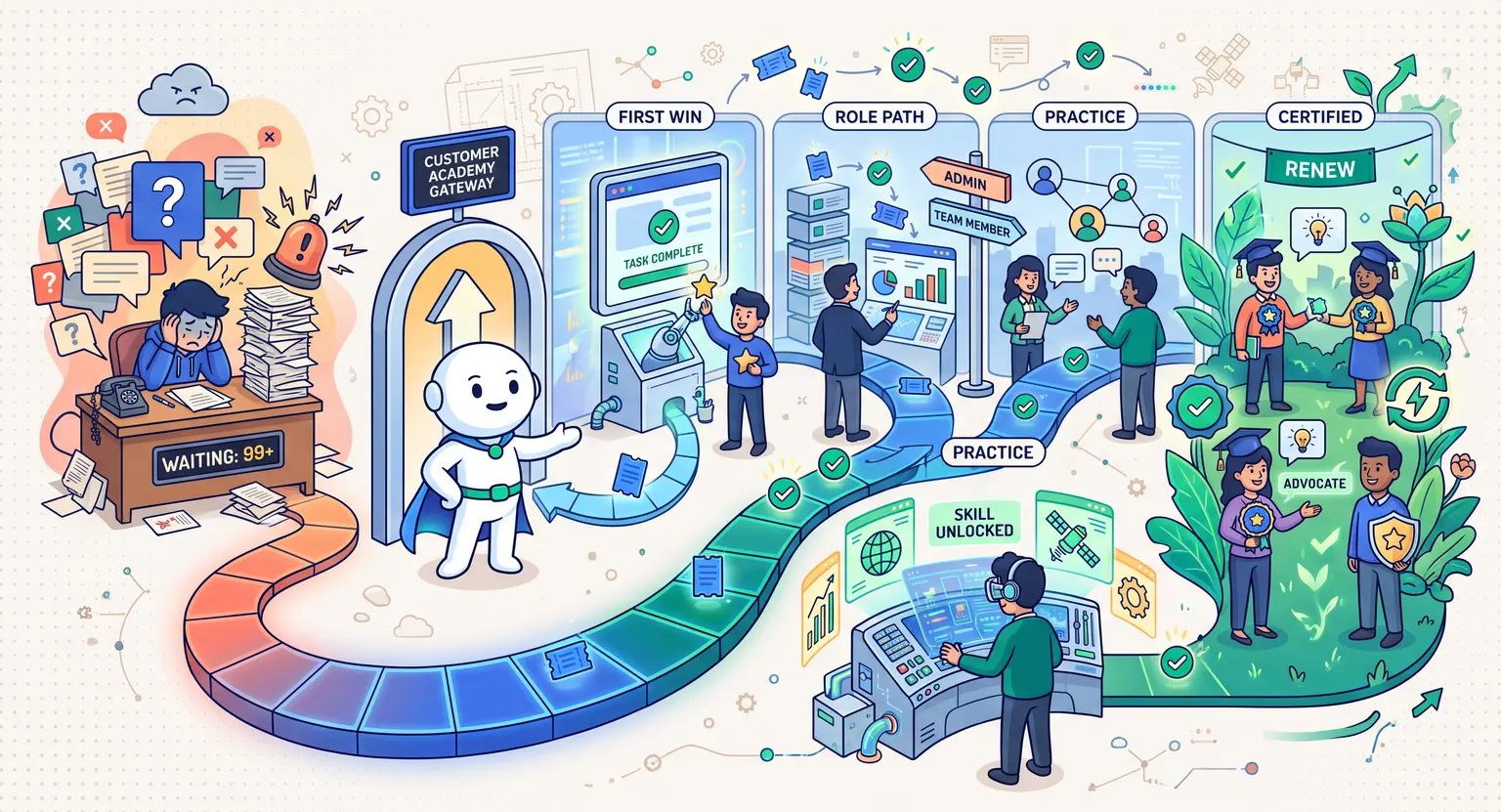
A successful training program is not an unorganized folder of screen recordings. It requires an intentional architecture built around the user lifecycle :
-
First-value activation : a lightning-fast sprint designed to get users their first tangible outcome in under 15 minutes.
-
Role-based competencies : tailored paths for specific team roles (for example, administrators vs. everyday daily contributors).
-
Feature deep-dives : practical masterclasses on secondary and advanced tools that drive sticky platform habits.
-
Industry strategy & best practices : frameworks that teach the broader philosophy behind why your solution works, cementing your brand as a trusted market authority.
When these four pillars work together, you build a self-serve ecosystem where users naturally progress from nervous beginners into enthusiastic power users.
Step-by-Step Blueprint : Building Your Customer Course Program
Step 1 : Identify Your Highest-Friction Onboarding Drop-Offs
Do not guess what your customers need to learn. Your existing customer data already holds the answers. Talk directly to your frontline support staff and audit your ticket tags from the last quarter.
Look for the recurring questions that consume 80% of your support team's energy.
Are users getting stuck connecting integrations?
Are they confused about workspace permissions?
Are they failing to invite team members?
Those friction points represent your first curriculum modules. By solving those specific roadblocks with interactive courses, you immediately eliminate support backlog.
Step 2 : Map Out Bite-Sized Learning Tracks
Customer education demands ruthless brevity. Your customers are busy professionals trying to get their own work done, not university students cramming for an exam.
Every video lesson should focus on a single objective and clock in under four minutes.
Group these micro-lessons into logical tracks based on user goals rather than technical features. Instead of naming a module "Settings & Configuration," name it "How to Set Up Your Workspace in 5 Minutes."
Outcome-based lesson titles keep learners engaged and motivated to finish.
If you manage diverse teams with varying permission levels, configuring team-based access for online courses ensures that managers, admins, and end-users only see the lessons relevant to their responsibilities.
Step 3 : Produce Dynamic, Action-Oriented Content
Nobody wants to watch a static slide deck with someone reading bullet points out loud. Create high-energy, clean screen recordings paired with picture-in-picture presenter video to build a personal human connection.
Follow a simple 3-part formula for every lesson : first, state the exact problem you are solving.
Next, demonstrate the solution inside your product step-by-step.
Finally, give the learner a specific action item to complete in their own account before moving to the next video.
Adding interactive checkpoints, downloadable cheat sheets, and practical exercises helps lock in knowledge retention far better than passive video watching ever could.
Comparing Customer Education Delivery Models
Different customer segments learn in different ways. Choosing the right structural format for your academy ensures maximum engagement across beginner, intermediate, and enterprise tiers :
| Academy model | Primary objective | Best format | Target audience |
|---|---|---|---|
|
Quick-start onboarding |
Immediate account activation and first quick win. |
Self-paced 2-minute video tracks. |
All newly registered users. |
|
Role & admin certification |
Deep operational mastery and governance. |
Graded quizzes, case studies, and badges. |
Account admins and department heads. |
|
Feature deep dives |
Expanding usage into secondary sticky features. |
Interactive walkthroughs & playbooks. |
Mid-stage active accounts. |
|
Live cohort onboarding |
High-touch adoption for enterprise rollouts. |
Group workshops using an enterprise LMS platform. |
High-contract enterprise clients. |
|
Micro-troubleshooting |
Deflecting repetitive technical tickets. |
60-second searchable screen captures. |
Users searching help channels. |
Integrating Courses Into the Customer Journey
The biggest mistake companies make with customer academies is treating them like a hidden island.
If your academy lives on an obscure URL that nobody remembers, it will gather digital dust. You must actively integrate your courses into the natural communication rhythm of your product.
Start right inside your welcome emails. Instead of sending a generic "thanks for signing up" note, deliver a clean link to a 10-minute starter course that guides them through initial setup.
Setting up a dedicated welcome email sequence ensures new sign-ups are guided to your academy on day one.
Next, use in-app modal prompts. When a user navigates to an advanced section of your software for the first time, present a friendly banner offering a quick 3-minute tutorial on how to use that exact tool.
Meeting customers at their point of need creates immediate adoption.
Finally, arm your customer support team with direct lesson links.
When a client submits a ticket asking how to execute a complex task, the support agent can provide a friendly summary alongside a direct link to the comprehensive academy lesson.
This resolves the ticket faster while teaching the client how to self-serve in the future.
Measuring the Real Business ROI of Customer Education
Customer education is not a vanity marketing project. It is a measurable revenue driver. To prove its impact to executive leadership, track these four core business metrics :
-
Time to First Value (TTFV) : measure how quickly new customers complete their initial setup and achieve their first product milestone compared to uneducated users.
-
Support ticket deflection rate : track the decrease in tier-1 "how do I" inquiries after introducing your academy modules.
-
Product adoption & feature breadth : analyze whether academy graduates utilize a wider variety of product features compared to non-learners.
-
Net retention & churn rates : compare 90-day retention rates between users who completed onboarding tracks and those who did not. Educated users consistently renew at higher rates.
When you connect learning completions directly to customer retention metrics, your training program becomes recognized as an essential engine of sustainable business growth.
3 Costly Mistakes to Avoid When Launching Your Academy
First, avoid creating massive, hour-long training videos. No customer wants to scrub through a 50-minute recording to find 30 seconds of actionable instruction. Break everything into modular chapters that are easy to search and re-watch.
Second, never create content without maintenance in mind. If your product interface updates frequently, avoid recording videos that focus too heavily on minor UI styling.
Focus on core workflows and principles so your training materials do not become outdated the moment your engineering team pushes a UI update.
Third, do not forget to reward completion. People love tangible proof of their skill. Award digital certificates, badges, or platform perks when users complete full certification paths.
When professionals share their certifications on LinkedIn, it creates free viral marketing for your company.
Explore Further : Scale Your Digital Training Infrastructure
-
Discover the best production tactics in video lessons best practices.
-
Keep learners hooked using our playbook on how to create engaging course content.
-
Take your academy everywhere with our guide on how to turn an online course into a mobile app.
-
Standardize team processes with our blueprint on how to create online compliance training for employees.
Frequently Asked Questions
Should customer education courses be free or paid?
For standard product onboarding and feature adoption, customer education should almost always be free to eliminate friction.
However, advanced industry credentials, accredited role certifications, and comprehensive partner training can be monetized using an all-in-one platform to sell online courses for specialized revenue streams.
How is customer education different from customer support?
Customer support is reactive troubleshooting when something breaks or confuses a user.
Customer education is proactive enablement that teaches users workflows, best practices, and strategic habits before frustration sets in, which helps retain membership members and software subscribers over the long term.
What is the ideal length for a customer training video?
Keep customer training videos between 2 and 5 minutes long.
Micro-lessons focused on a single outcome or workflow achieve the highest completion rates because busy professionals can learn without interrupting their workday.
How do you get users to actually finish your customer courses?
Trigger course invitations inside the product at key milestone moments, award verifiable digital certificates, break lessons into bite-sized chapters, and test practical understanding using well-crafted knowledge checks like those found in how to create quizzes for online courses.




 How to Create a Course Refund Policy (Templates & Best Practices for 2026)
 How to Run a Beta Version of an Online Course (2026 Guide)
 How to Create a Cohort-Based Online Course (2026 Guide)
 How to Sell an Online Course With a Quiz Funnel (2026 Guide)
 How to Sell an Online Course Through a Sales Call (2026 Guide)