







Client Onboarding for Coaches: The Step-by-Step Welcome Framework
Client Onboarding for Coaches
Key Takeaways
-
First Impressions Matter : the onboarding period defines how clients respect your time, boundaries, and program structure.
-
Automation Rules : use a best all-in-one course platform like LearnyBox to streamline your contracts, payments, and calendar invites.
-
Clear Boundaries : establishing communication guidelines from day one prevents late-night text messages and scope creep.
-
Value Delivery : give them a quick win immediately after signing up to destroy buyer's remorse in its tracks.
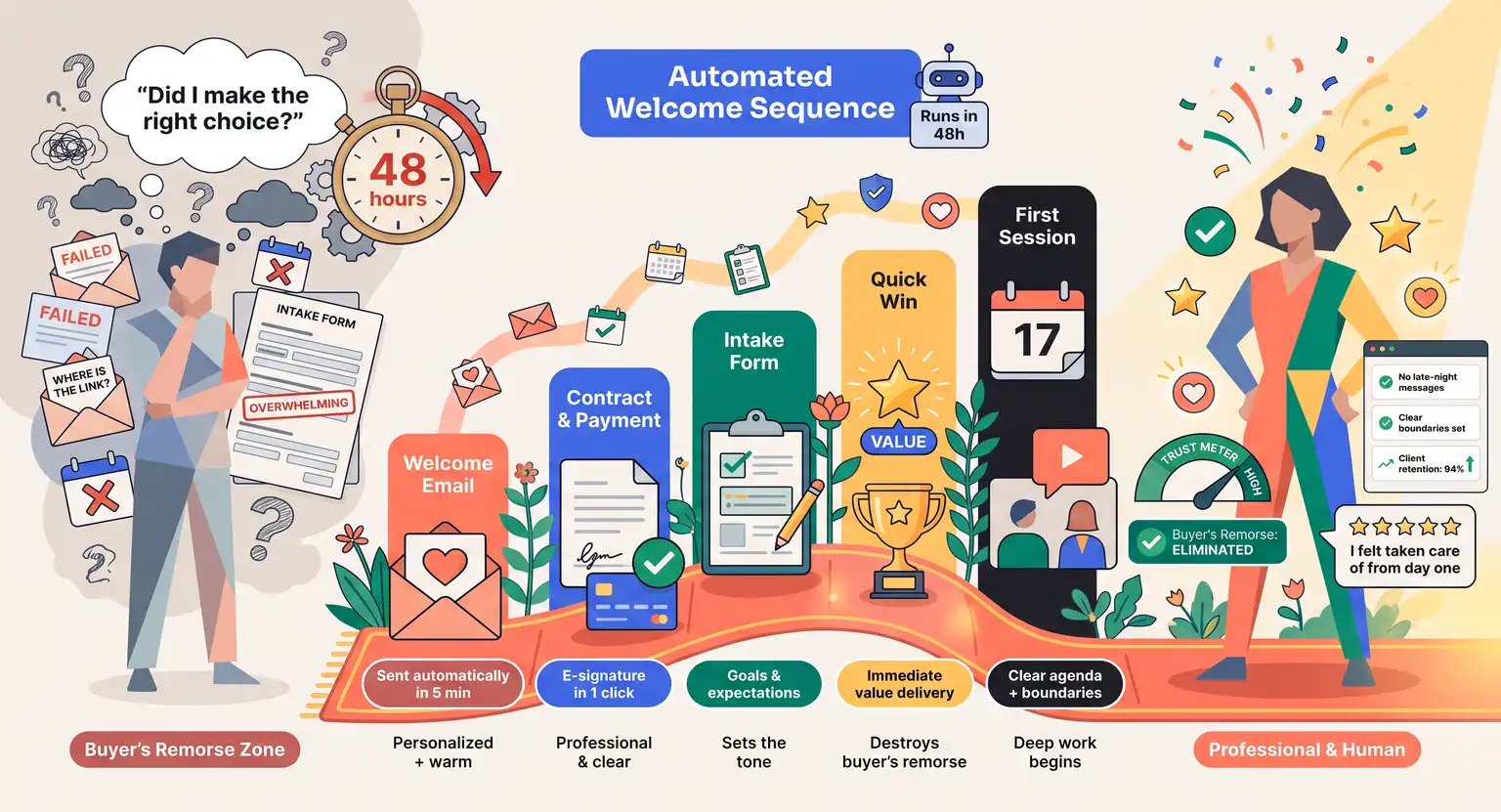
You just closed a new coaching client. The deposits are cleared, the contract is signed, and the excitement is real… But right after the initial high, a tiny wave of anxiety often creeps into your client's mind.
Did I make the right choice? Is this actually going to work?
This is what psychologists call buyer's remorse, and it is completely normal.
How you handle the next forty-eight hours can make or break the entire coaching relationship.
A smooth, welcoming onboarding process doesn't just show you are organized. It establishes trust, sets clear boundaries, and prepares your client to do the deep work they hired you for.
But many coaches treat onboarding as a chaotic afterthought - sending disjointed emails, forgetting calendar links, or dumping massive intake forms on Day One.
We are changing that today. Here is your ultimate guide to creating a seamless, professional client onboarding experience that delights your clients and protects your sanity.
The Psychology of the Welcome Experience
When a client pays you, they are investing in a future version of themselves and that feeling is fragile. If they immediately land in a digital black hole with no next steps, anxiety spikes.
But a warm welcome experience does the opposite - it makes them feel held, safe, validated, and excited. And you do not need to spend hours manually typing out welcome emails every time someone joins.
The secret is a structured workflow that triggers automatically.
When they pay, they immediately receive a personalized message that outlines exactly what happens next. This sets a professional cadence. It tells them : "I have got you. You are in safe hands."
Before you even think about the first coaching call, you must first design the framework of your engagement.
If you are still figuring out what goes into your package, take a look at our guide on how to structure a coaching offer to ensure your backend matches your frontend delivery perfectly.
Once that package is solidified, your onboarding is simply the red carpet leading into it. It should make the transition from prospect to client feel utterly effortless, wiping away any lingering doubts about their financial investment in themselves.
When people know what to expect, they relax. And a relaxed client is one who is open, receptive, and fully prepared to put in the effort required to transform their life or business.
The Core Elements of an Onboarding Flow
A great onboarding experience consists of four phases built step by step.
The first is the Financial and Legal Handshake - never start coaching without a signed agreement and cleared payment. It is risky and unprofessional.
Your onboarding should instantly prompt them to sign a digital contract. At the same time, study how to set up payments for digital products to streamline your checkout.
Second is the Intake Questionnaire. You need essential data to help them. Ask targeted questions :
-
What is the biggest roadblock keeping you from your goals now?
-
How do you prefer to receive feedback, whether direct or gentle?
-
What would make this coaching package a massive success?
Keep this form clean. A long questionnaire acts as a barrier. Keep it to under ten high-impact questions so they complete it instantly.
Third is the Calendar Integration. Nothing kills momentum faster than an email tag - provide a scheduling link inside your welcome portal and let them book their first Kickoff Session immediately. This removes friction and gives them a date to anticipate.
Fourth is the Resource Portal. Give them a short welcome video, a worksheet, or private portal access - this keeps them engaged and ensures they arrive at their first call with momentum already built, maximizing their chances of reaching their destiny.
Coaching Onboarding Stage Toolkit Summary
| Stage name | Primary onboarding goal | Tools and actions needed | Client core experience |
|---|---|---|---|
|
Legal and checkout |
Secure the business agreement and protect both parties from future scope creep. |
Digital contract signature and secure checkout. |
Feels safe, legal, and officially committed. |
|
Welcome kit delivery |
Eliminate initial buyer anxiety and set the conversational tone. |
Send automated welcome message with portal login data. |
Feels happy, excited, and fully supported. |
|
Intake and scheduling |
Gather strategic client diagnostic data and lock calendar spots. |
Short client survey and online calendar link. |
Feels focused, structured, and prepared for work. |
|
Resource portal |
Deliver an instant win before the first physical interaction. |
Access to pre-made worksheets or introductory videos. |
Feels proactive and productive right away. |
Systems and Automations that Keep It Human
So, how do we easily make all of this happen without losing your personal touch?
The elegant answer is simple, smart business automation. Many modern coaches fear that using templates or automated workflows makes them look cold, robotic, or distant.
But the ultimate reality is exactly the opposite. When you automate the boring admin tasks, such as invoicing, sending contracts, and emailing links, you free up your mental bandwidth to show up fully present during your calls.
And you can inject your vibrant personality directly into your automated welcome emails. Write them just like you would talk to a friend over coffee. Use short videos to say a quick hello and map out the journey ahead.
A tool like LearnyBox allows you to keep all of these moving parts under one roof. Instead of duct-taping five different softwares together, you can run your landing pages, checkout pathways, and client communication sequences seamlessly.
Plus, when you integrate tools for email marketing for course creators and coaches, you can tag clients based on their progress.
Imagine sending a friendly, automated check-in email on day fifteen just to ask : "How are you feeling about the unique goals we set last week?" It takes you absolutely zero seconds, but it feels incredibly supportive to your client.
Setting Safe Boundaries
Here is a painful truth : a client who crosses boundaries on day thirty usually got the green light to do so on day one.
If you do not teach people how to treat you, they will make up their own rules. Your welcome kit must clearly outline your working hours, cancellation policies, and preferred channels.
Let them know when they can expect replies. If you require twenty-four hours notice for rescheduling, say it now. Specify whether you use email, Voxer, WhatsApp, or Slack. If you do not want messages at late hours, do not respond then.
Setting these standards does not make you mean. It builds respect. Clients want to work with a leader who values their own time. By laying rules out in writing, you bypass awkward conversations later.
Ultimately, healthy boundaries protect the sacred space of your coaching relationship, ensuring that your actual sessions remain productive, safe, and eminently focused on delivering your client's desired transformation.
Related Material
-
Need to establish your pricing model before launching? Learn how to optimize your online course pricing strategy for maximum value.
-
Planning to scale your coaching business? Get our step-by-step master guide on how to grow an email list to continuously attract high-value clients.
Frequently Asked Questions
How long should my coaching client onboarding take?
Ideally, the administrative part of your onboarding should take less than fifteen minutes for the client to complete.
They should be able to sign the contract, process their payment, schedule their initial session, and complete the intake form all in one clean sitting.
Keeping it swift and organized prevents drop-offs and maintains momentum.
What should I include in a coaching welcome kit?
Your welcome kit should be a simple digital file or a dedicated page in your client portal.
It should contain a warm welcome video, step-by-step instructions for booking calls, your boundaries and hours of operation, links to your resources, and a clear cancellation policy. This serves as a helpful reference point they can return to throughout your relationship.
Should I use video messages during client onboarding?
Yes, personalized video welcomes are incredibly powerful. Sending a quick, two-minute video saying hello and expressing your excitement makes the automation feel completely human.
You can record a generic video for all new clients or create a custom one for high-ticket clients to make them feel exceptionally valued.
Can I automate onboarding without losing my personal coaching touch?
Absolutely. True automation simply handles the logistics so you can focus on the relationships.
By automating the sending of contracts, scheduling links, and basic intake surveys, you remove human error and ensure a premium experience.
This saves your energy for the deep coaching sessions where your human touch is actually needed.



 How to Create a Course Refund Policy (Templates & Best Practices for 2026)
 How to Run a Beta Version of an Online Course (2026 Guide)
 How to Create a Cohort-Based Online Course (2026 Guide)
 How to Sell an Online Course With a Quiz Funnel (2026 Guide)
 How to Sell an Online Course Through a Sales Call (2026 Guide)