







How to Create Different Access Levels for Online Course Students
How to Create Different Access Levels for Online Course Students
Every student entering your digital academy arrives with a distinct budget, different background knowledge, and individual goals.
If you offer only a single price point with identical access for everyone, you end up turning away budget-conscious beginners while simultaneously shortchanging ambitious students who want your direct feedback.
Segmenting your digital training into structured tiers solves this challenge. You turn one core curriculum into a flexible product suite without creating three separate courses from scratch.
Key Takeaways
-
Tiered access allows you to charge premium rates for personal time while keeping entry costs accessible for self-starters.
-
Tag-based permission systems are far easier to maintain than duplicating course portals for different audiences.
-
Displaying locked modules with clean upgrade triggers generates consistent recurring bumps in lifetime customer value.
-
Building a frictionless ecosystem starts with an all-in-one platform at LearnyBox that ties checkouts, community spaces, and content gating together.
Why Single-Tier Course Access Limits Your Growth
Selling an all-or-nothing course puts you in an awkward pricing position.
Price your course at $997, and you lose thousands in sales from motivated beginners who simply cannot afford that upfront expense.
Drop it to $149, and you leave massive revenue behind from clients who would happily pay $2,500 for group audits and personalized coaching.
Beyond revenue, access levels dramatically improve student completion rates. Beginners often get overwhelmed when dumped into a massive library packed with 80 hours of video, complex toolkits, and active discussion boards. Giving them a focused track keeps them moving.
And let's be honest about your workload. Your time is finite. You cannot offer weekly live calls or assignment reviews to five hundred students at a bargain price without burning out.
The Classic Three-Tier Access Blueprint
You do not need an overly complicated matrix of permissions. In fact, keeping your tier structure transparent makes selling much easier.
Here is the framework top course educators use to maximize conversions :
-
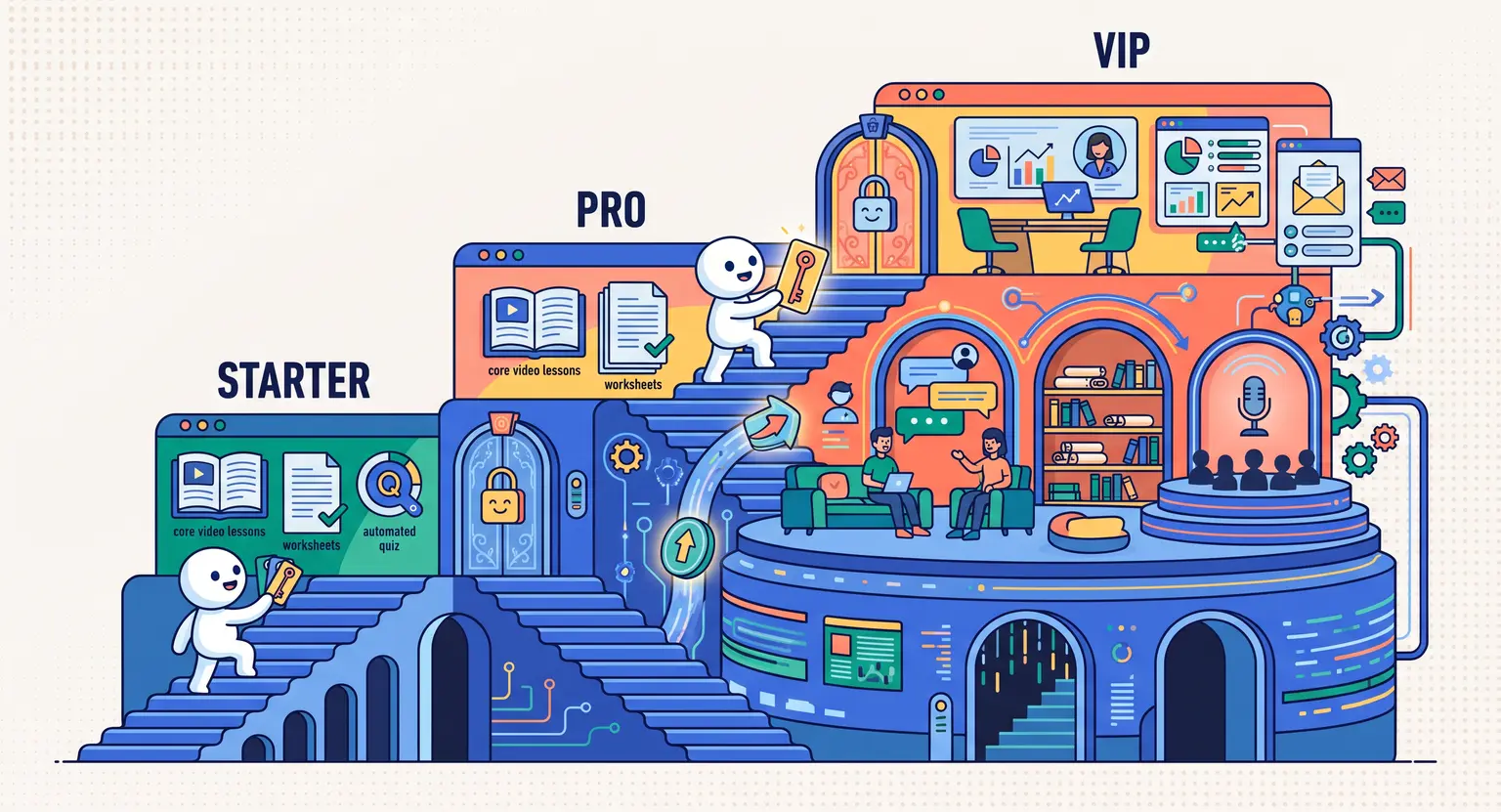
Tier 1 - Self-Study (The Core Foundation) : includes the pre-recorded video lectures, standard PDF worksheets, and automated quizzes. No direct instructor support or private community access.
-
Tier 2 - Community & Live Q&A (The Pro Experience) : adds access to your student peer forum, monthly live group office hours, and curated template libraries.
-
Tier 3 - Mentorship & Audit (The VIP Accelerator) : adds personalized homework reviews, direct messaging with teaching assistants, private mastermind channels, and portfolio critiques.
Notice how the core video material remains identical across all three tiers. You are not recording three different courses; you are simply layering support, interaction, and supplemental assets around the base curriculum.
| Access level | Included content & features | Support & feedback | Target audience |
|---|---|---|---|
|
Starter / Self-Paced |
Pre-recorded modules, foundational checklists, lifetime knowledge base. |
Automated grading, bot support. |
Budget-conscious DIY learners. |
|
Pro / Community |
Core modules + resource vault, live monthly Q&A, peer network. |
Community forum, group call answers. |
Active practitioners needing networking. |
|
VIP / Executive |
Everything in Pro + private masterclasses, bespoke project audits. |
1-on-1 reviews, direct chat access. |
Fast-track professionals & teams. |
Technical Implementation : Tags vs. Separate Portals
Years ago, course creators who wanted multiple tiers were forced to clone their course three times inside their LMS. That meant updating a typo in Module 2 required editing three separate dashboards. It was messy and prone to broken links.
Today, the industry standard relies on single-course architecture paired with user tags and conditional visibility. Here is how modern gating operates behind the scenes :
-
Tag-based visibility : you build one master course. When someone buys the Pro tier, the checkout system applies a specific user tag (e.g., tier-pro). Modules marked for Pro or VIP automatically display for them.
-
Conditional asset downloads : within a single lesson, you can gate specific files. Self-paced students see the video player, while Pro students see the bonus templates and project files right beneath the video.
-
Restricted community channels : the same tag system opens access to specialized discussion channels without forcing users to register separate forum accounts.
When configuring time limits on your tiers, you will also want to study how to set course access expiration dates so your self-paced licenses expire cleanly without disturbing lifetime VIP memberships.
How to Turn Locked Tiers into Upsell Engines
How you treat locked content inside your student interface will either frustrate your users or create a steady stream of mid-course upgrades. The trick is making locked modules visible without being pushy.
Keep advanced lessons visible in the course navigation bar, but place a small lock icon next to the title.
When a Starter student clicks on "Advanced Funnel Optimization," do not redirect them to an ugly 403 error page. Instead, open a friendly modal window :
-
Show a quick 60-second video preview or bulleted summary of what the module covers.
-
Explain clearly that this lesson is part of the Pro tier.
-
Offer an instant one-click upgrade button that prorates what they already paid toward their initial purchase.
This subtle visibility reminds students of the greater depth available to them exactly when their learning momentum is at its peak.
Drip Scheduling Across Different Member Roles
Access levels do not have to be solely about content volume; they can also govern content release velocity. Pacing your content delivery keeps students from binging everything in forty-eight hours and then abandoning your community.
For example, you might grant your VIP cohort instant access to all training modules right away so they can execute their strategies quickly.
Meanwhile, your self-paced tier receives one module every Monday morning over eight weeks. This drip pace keeps baseline students accountable while matching their natural learning bandwidth.
So how do you choose which modules to drip? Focus on action-oriented milestones - require students to complete fundamental exercises before unlocking complex capstone projects.
Three Costly Gating Mistakes to Avoid
While segmenting your access levels delivers tremendous upside, several technical and design pitfalls can undermine your efforts if you are not careful.
First, avoid creating too many micro-tiers. Offering five different pricing permutations with tiny variations will confuse your prospective students. When buyers are confused, they click away without buying anything.
Second, never leave your manual permissions unchecked. Always test your checkout funnels using test student accounts for each tier.
Verify that Starter accounts cannot access private Zoom links embedded in higher modules, and ensure download links cannot be discovered via direct URLs.
Third, ensure your upgrade paths are completely automated. If a student wants to upgrade from Starter to VIP at 11 PM on a Saturday, they should not have to email support and wait until Monday morning for manual tag adjustments.
Instant gratification drives higher lifetime value.
Putting It All Together
Structuring tiered access levels is not about gatekeeping knowledge. It is about tailoring your educational delivery to meet students where they are in their journey. When you align your course architecture with varying levels of budget and hands-on guidance, everyone wins.
Take an inventory of your current materials today. Separate your passive video lessons from high-touch coaching elements, organize your tags, and set up your multi-tier curriculum for sustainable scale.
Frequently Asked Questions
How many access levels should an online course offer?
For most creators, three tiers represent the sweet spot : Self-Paced (Basic), Community/Pro (Intermediate), and VIP Coaching (Premium).
Offering more than four tiers often creates decision paralysis for prospective buyers.
Can I upgrade student access levels automatically after a purchase?
Yes. Modern platforms use webhooks and CRM tags to instantly update member permissions when an upgrade checkout or order bump is completed.
What is the best way to handle access levels for final assessments?
You can restrict grading and certification checks to specific tiers. When planning your curriculum, review our guide on how to design a final exam for an online course to align practical testing with your premium student tracks.
Should lower-tier students see locked content in their course dashboard?
Yes, displaying locked modules with a subtle padlock icon and an upgrade call-to-action is an effective, non-intrusive method to drive organic tier upgrades.







 How to Create a Course Refund Policy (Templates & Best Practices for 2026)
 How to Run a Beta Version of an Online Course (2026 Guide)
 How to Create a Cohort-Based Online Course (2026 Guide)
 How to Sell an Online Course With a Quiz Funnel (2026 Guide)
 How to Sell an Online Course Through a Sales Call (2026 Guide)