







Best Webinar Software in 2026: The Definitive Expert Guide
The Best Webinar Software in 2026 : The Definitive Expert Guide
You have probably felt the sting of hosting a webinar where everything that could go wrong did... The slides froze, the chat box lagged, or worst of all, half of your registrants never even received their login links.
It is a nightmare that haunts anyone trying to sell online or run virtual training sessions... And let's be honest : in 2026, the expectations are higher than ever.
Your audience is not willing to wait while you figure out how to share your screen or why the audio sounds like you are sitting inside a tin can. They will simply close the tab and check their social feeds.
Choosing the best webinar software is no longer just about finding a tool that streams video. It is about choosing a platform that turns casual viewers into loyal customers, integrates seamlessly with your business, and runs without a single hitch.
But with dozens of platforms screaming for your attention, how do you find the one that actually fits your workflow?
Let's cut through the marketing noise and look at what really works.
Key Takeaways
-
Integration is King : the best webinar tools do not operate in a silo. They must link directly with your checkout pages, email autoresponders, and CRM pipelines.
-
Ditch the Downloads : in 2026, browser based access is a strict requirement for high attendance rates.
-
Automate Smarter : look for software that easily accommodates evergreen, automated, and live sessions.
-
Expert Recommendation : for course creators and marketers, tools like LearnyBox Webinars offer an all in one approach that eliminates the need for expensive third party connectors.
-
Action Plan : before picking a tool, map your entire strategy using a detailed, step by step guide on how to organize a successful webinar to identify your exact pipeline requirements.
The Shift in 2026 : Why Frankenstein Stacks are Dying
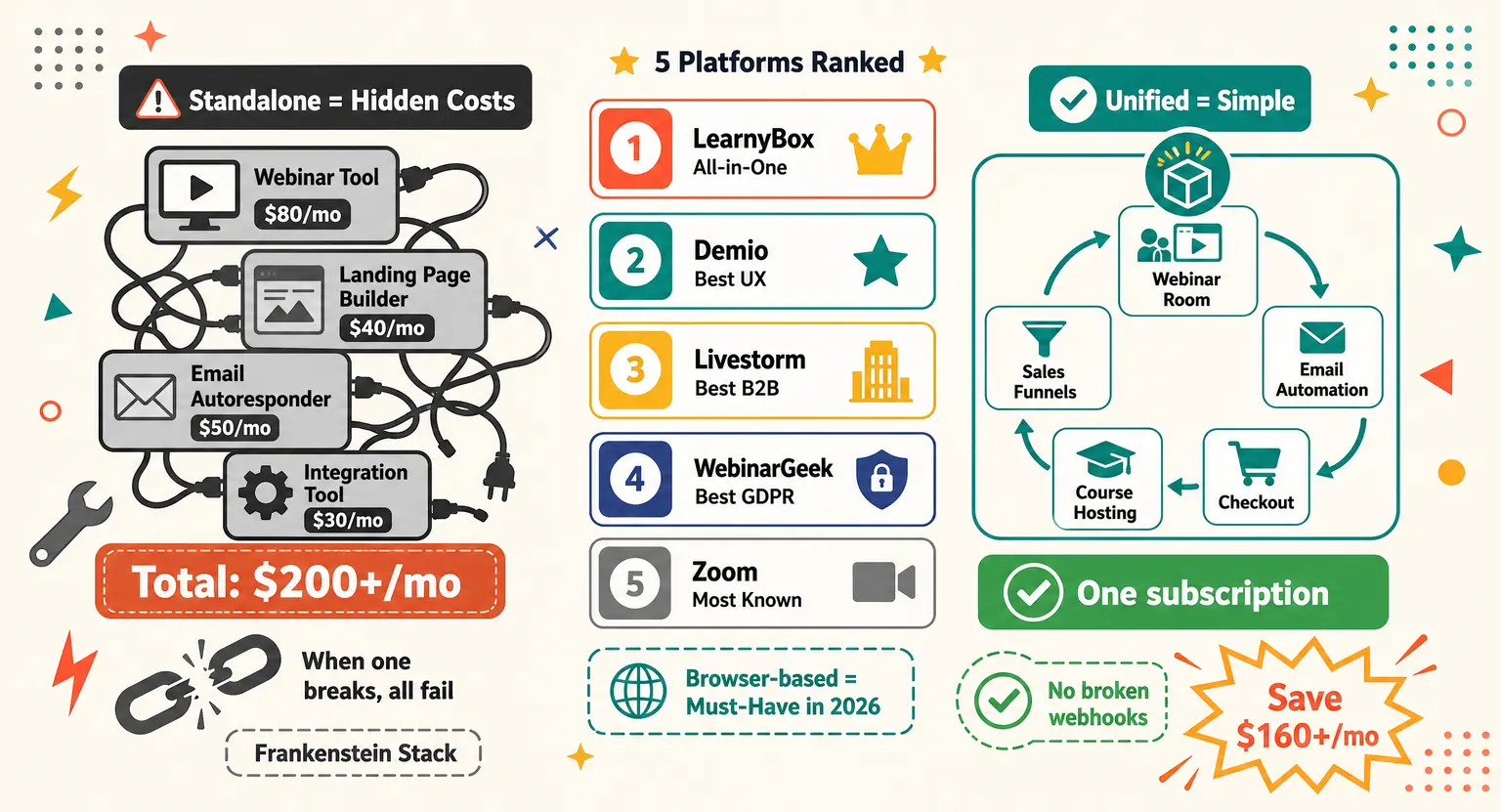
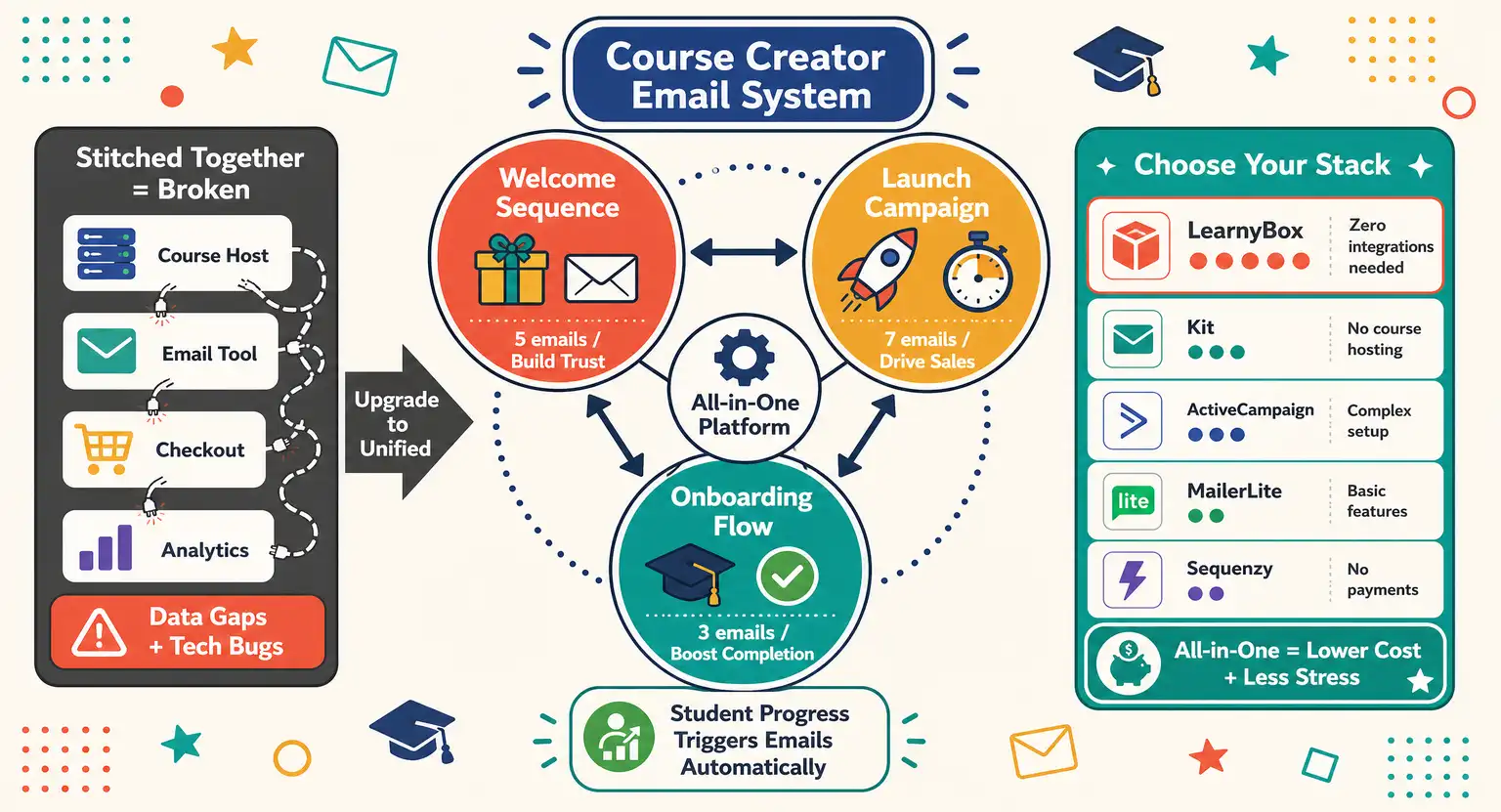
For years, standard online marketers relied on what I like to call the Frankenstein stack. You had one software to host the live webinar, another to send out the emails, a third one to build the registration page, and a fourth to process payments...
And you spent hours using automated bridge software just to make sure these systems talked to each other !
But when one link in that fragile chain breaks, the whole system collapses...
If a buyer purchases your product during a live pitch and the webhook fails to update your database, you end up spending your evening doing manual customer support.
It is exhausting and entirely unnecessary.
Today, the most profitable online businesses are migrating toward unified systems. They realize that having everything under one roof keeps things remarkably simple.
For example, if you look at the LearnyBox ecosystem, you see how much easier life becomes when your sales funnels, email automation, and webinar hosting live in the same place.
You do not have to worry about API keys or breaking automated links. Everything just works because it was designed to work together from day one.
So before you fall in love with a shiny feature list on a standalone webinar tool, ask yourself a hard question : how much time will you lose trying to link it to the rest of your business?
If the answer is too much, it is time to look at all in one alternatives.
The Top 5 Webinar Software Platforms Analyzed
Let's get into the nitty gritty of the top contenders currently dominating the market in 2026.
These platforms have been vetted for reliability, ease of use, and overall conversion capabilities.
1. LearnyBox : The Ultimate Sales and Course Creator Platform
If you are looking to sell digital products, courses, or high ticket coaching, LearnyBox deserves your full attention.
It is not just a streaming tool; it is a comprehensive engine built to convert.
The standout feature here is the native integration. You do not need a separate email subscription, a standalone checkout system, or landing page builders. LearnyBox handles everything from the minute a user registers to the second they make a purchase.
You get highly professional, customizable registration templates that load lightning fast. The webinar room itself is crisp, browser based, and heavily optimized for interaction.
You can easily trigger timed offers, display interactive call to action cards, and chat with your audience in real time.
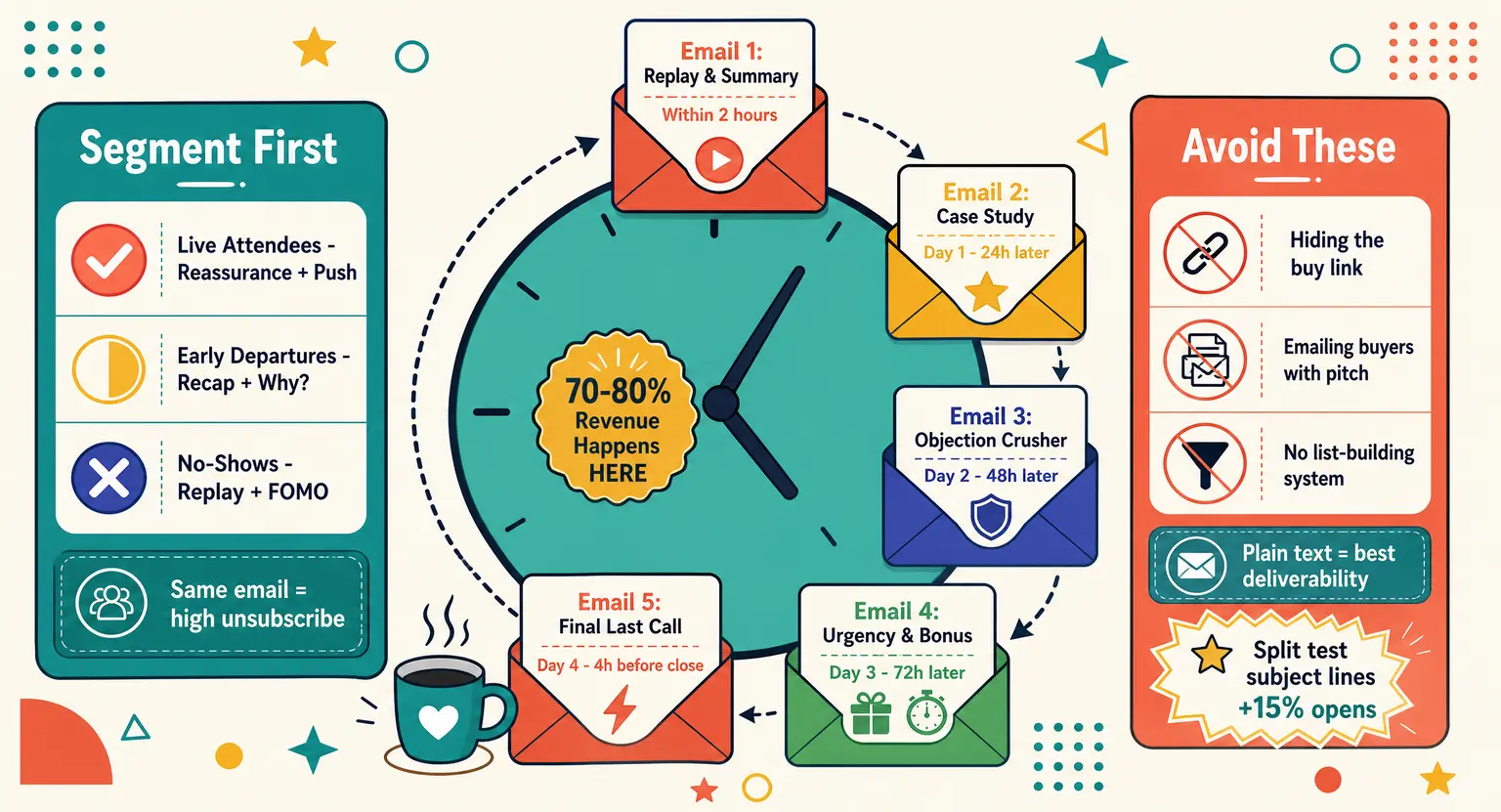
But where it truly shines is in the follow up automation. Once the session ends, the platform knows exactly who stayed until the end, who left early, and who did not show up at all. It automatically routes them into tailored communication sequences to maximize your sales.
If your goal is to build a business rather than just host occasional meetings, keeping everything consolidated is a massive competitive advantage. It is why LearnyBox is consistently rated alongside the best online course platforms on the market today.
2. Demio : The Marketer's Browser Based Companion
Demio has earned a strong reputation among marketing teams who want a sleek, modern, and completely browser based experience. There are absolutely no annoying desktop downloads or plugins required for your attendees, which drastically reduces entry barriers.
The user interface is exceptionally clean. From the moment people join, they are greeted by a polished room that makes your brand look highly professional. You can run live, hybrid, or evergreen automated sessions from a single dashboard.
And Demio excels at in session engagement. The polls, featured actions, and handouts features are highly intuitive and help keep your audience's eyes glued to the screen.
But Demio's limitation is that it remains a standalone tool. While it integrates with major email platforms, you will still need to construct outside landing pages and checkout systems to complete your sales pipeline.
If you are focused heavily on lead generation and want to test various tactics to grow an email list, it is a solid choice. Just be prepared to manage the external integrations required to tie it all together.
3. Livestorm : Built for B2B Virtual Events and Onboarding
Livestorm has carved out a massive niche in the corporate and B2B SaaS sectors. It is designed to host everything from small product demonstrations and customer onboarding sessions to large enterprise virtual events.
Like Demio, Livestorm is entirely browser based, making it incredibly easy for professional clients to join. It features a robust registration engine and excellent out of the box styling options.
The real power of Livestorm lies in its analytical dashboards. It provides deep, granular insights into attendee behavior, tracking when they joined, how they interacted with polls, and which questions they asked. This data is incredibly valuable for sales teams conducting post event follow ups.
But for individual creators or smaller digital marketers, Livestorm can feel a bit clinical. Its pricing plans lean heavily toward the enterprise side, and it lacks the built in marketing funnels or sales triggering features that course creators need to close deals directly on the spot.
4. WebinarGeek : The Safe, GDPR Compliant Powerhouse
WebinarGeek is a fantastic option, particularly if you operate within European markets or place a massive premium on data privacy and compliance. Based in Europe, this browser based platform is fully optimized for strict GDPR standards.
It offers a highly reliable experience with minimal lag. You can easily set up live, automated, or hybrid webinars within minutes.
The registration editor is user friendly and lets you customize pages to match your exact branding.
In recent updates, WebinarGeek has added impressive AI assistant features. These tools help you automatically generate titles, outlines, and summaries for your events, saving you tons of preparation time.
But similar to other standalone platforms, it does not manage your core business...
You will still need separate software to host your training materials, run your primary sales channels, or handle complex payment gateways.
For teams wanting a hyper compliant, dedicated webinar tool, it is top tier; but for solopreneurs, it means another monthly subscription to keep track of.
5. Zoom Webinars : The Safe, Familiar Corporate Giant
We cannot talk about virtual events without mentioning the household name : Zoom. It is the platform that almost everyone on the planet knows how to use, which is its single greatest strength.
When you host a Zoom Webinar, you run almost zero risk of attendees being confused by the interface. They know exactly where the mute button is, how to drop a message in the chat, and how to raise their hand. It is virtually foolproof.
But standard Zoom Webinars feel incredibly corporate and unbranded. The interface is grey and rigid, and you cannot easily customize the attendee room to fit your business identity.
More importantly, Zoom does not have native sales funnels, visual checkout features, or integrated automated sequences designed to pitch digital products. It is built for communication, not conversion.
If you are conducting internal employee training or broad corporate broadcasts, it is highly reliable. If you are trying to make a living selling digital assets, you will find yourself severely limited.
How the Top Platforms Compare Head-to-Head
Choosing between these tools depends on your specific goals. To help you see how they stack up side by side, we have mapped out their core metrics, ideal use cases, and deployment formats below.
| Platform | Best for | Formats supported | Standout feature | Ecosystem fit |
|---|---|---|---|---|
|
LearnyBox |
Course Creators, Marketers, Digital Entrepreneurs |
Live, Hybrid, Evergreen Automated |
All in one sales funnels, integrated payments, automated follow ups |
A complete all in one platform; replaces email tools, funnel builders, and hostings. |
|
Demio |
Marketing Teams, Lead Gen Specialists |
Live, Hybrid, Automated Replays |
Ultra clean, modern user friendly browser interface |
Standalone tool; needs external CRM and landing page integrations to work at scale. |
|
Livestorm |
B2B Corporations, Customer Onboarding |
Live, On Demand, Virtual Events |
Deep B2B CRM analytics and data enrichment features |
Standalone corporate tool; integrates with Salesforce and HubSpot for sales teams. |
|
WebinarGeek |
GDPR focused Brands, European Businesses |
Live, Automated, Hybrid |
Strict privacy compliance and built in AI writing assistant |
Standalone system; requires external tools to run payment checkouts or host courses. |
|
Zoom Webinars |
Corporate Meetings, Broad Public Training |
Live Only |
Unrivaled global brand familiarity and robust streaming stability |
Standalone video engine; requires heavy Zapier usage to connect with lead systems. |
Crucial Non-Negotiable Features for High Converting Webinars
If you want to run virtual events that actually generate revenue, you need to look past basic streaming quality. Any modern platform can broadcast a video feed, but not every platform can convince a viewer to take action.
Prioritize these dynamic elements :
-
Browser Based Attendance : never force your attendees to download an external app or program just to watch your webinar.
Every single click, delay, or installation request lowers your show up rate. If joining your broadcast feels like a chore, people will simply skip it. -
Dynamic Interaction Tools : you need real time polls, dynamic chat features, and Q&A management systems that feel interactive, but more importantly, you need the ability to push high converting call to action cards directly onto the screen.
This allows users to click and buy instantly without leaving the broadcast room. -
Robust Automated and Hybrid Capabilities : running live webinars all the time is exhausting. You need a platform that lets you record your perfect session once and convert it into an evergreen, automated asset.
This system should run seamlessly on autopilot, appearing live to new registrants while they attend on their own schedule. -
Deep Segmentation Data : your software must track exactly what your audience does. Did they drop off after fifteen minutes? Did they stay for the final offer but skip the checkout?
Having access to this behavioral insight is what transforms standard outreach into highly profitable marketing campaigns.
The Real Cost of Standing Standalone : What No One Tells You
When you read typical reviews comparing webinar programs, they usually list pricing plans of individual software. But they often leave out the hidden expenses of running separate tools.
If you purchase a dedicated webinar tool for $80 a month, you might think you are getting a great deal... But then you realize you also need a fast landing page builder to host your sign up sheets, which adds another forty dollars.
Next, you need a powerful autoresponder for your email outreach, costing you an extra $50.
Finally, you have to connect all of these pieces with a premium integration account, adding another $30 to your monthly overhead.
Pretty soon, your cheap standalone solution is costing you well over $200 every single month. And you still have to deal with the technical headache of maintaining four different software connections.
By switching to a unified platform, you completely bypass this hidden tax. You pay a single monthly subscription that handles your entire business, from your hostings and funnels to your email marketing.
It is a smarter, cleaner way to run things.
Explore Further
To get the absolute most out of your digital marketing efforts, check out these deep dives and templates from our research library :
-
Design Your Perfect Sequence : maximize your show up and conversion rates by mastering a proven, automated webinar follow up email sequence that turns missed attendees into active buyers.
-
Write Like an Expert : stop guessing what to say when the camera turns on and download our free, high converting webinar script template today.
-
Kickstart Your Launch : learn how to package your knowledge, build your landing pages, and successfully understand how to launch an online course using integrated systems.
-
Nurture Your Audience : develop a solid communication foundation by building a dedicated system using our guide on email marketing for course creators to keep your list highly responsive.
Frequently Asked Questions
Got lingering doubts about your upcoming digital events? Here are clear, reliable answers to the most common questions marketers ask.
What is the best webinar software for selling products?
If your main goal is revenue, an all in one platform like LearnyBox is best because it natively combines registrations, automated emails, secure checkouts, and streaming under one roof without needing third party links.
Do my webinar attendees need to download an application?
No, the top systems run completely in the browser, allowing your registered audience to join instantly with a single click from any modern computer or mobile device.
Can I run automated webinars that look live?
Yes, automated webinars play pre recorded video on a scheduled loop while a chat module lets you easily interact with active attendees in real time to secure purchases.
Why shouldn't I use Zoom for sales webinars?
Zoom is built for corporate meetings, not conversions. It lacks checkout templates, landers, countdown clocks, and automated emails to help you close sales.




 How to Create a Course Refund Policy (Templates & Best Practices for 2026)
 How to Run a Beta Version of an Online Course (2026 Guide)
 How to Create a Cohort-Based Online Course (2026 Guide)
 How to Sell an Online Course With a Quiz Funnel (2026 Guide)
 How to Sell an Online Course Through a Sales Call (2026 Guide)