







How to Create Team-Based Access for Online Courses (2026 Guide)
How to Create Team-Based Access for Online Courses
Selling individual courses directly to solo learners is the foundation of most online education businesses.
It works well, but it also means running on a continuous customer acquisition treadmill. Every month starts at zero, and you need a constant stream of new buyers just to maintain revenue.
Then a corporate buyer emails you. They run a twenty-person department and want to buy your curriculum for their entire staff. Suddenly, you realize your platform only allows one email address per checkout.
You scramble, manually create twenty separate accounts, send logins via email, and track everything in a messy spreadsheet.
That manual process breaks down fast. If you want to tap into the lucrative corporate training market, you need native team-based access.
Multi-seat functionality lets businesses buy bulk licenses, assign team members instantly, and track progress without needing your personal intervention.
Key Takeaways for Setting Up Team Access
-
Team-based access turns one-off retail sales into high-ticket recurring accounts using scalable enterprise LMS solutions.
-
Seat management requires a parent-child account hierarchy : team managers control seat allocation while team members consume lessons.
-
Self-serve checkout with automatic license provisioning drastically reduces administrative overhead for both parties.
-
Manager dashboards that display progress and completion certificates encourage renewals and build reliable B2B recurring revenue models.
Why Group Licensing Changes the Unit Economics of Course Creation
Selling to companies is fundamentally different from selling to individual consumers.
When an individual purchases a course, they pay out of their personal pocket. They look for discounts, deliberate over checkout pages, and often struggle to complete the lessons.
When an HR director or department manager buys your course, they use a corporate budget to solve an operational problem.
They care about business outcomes, skill gaps, team alignment, and fast onboarding. A single transaction can easily net five to fifty times the value of a regular consumer sale.
Selling group access opens doors to organizations that need mandatory upskilling or online compliance training for corporate staff, which creates predictable renewal cycles. Corporate clients renew annually if your training delivers results and their management team can verify employee participation.
Team access also protects your intellectual property. Instead of five colleagues sharing one password and muddying your analytics, each employee gets a dedicated seat with individual progress tracking, distinct quiz records, and personalized certificates.
The Architecture of Team-Based Access : How It Works Under the Hood
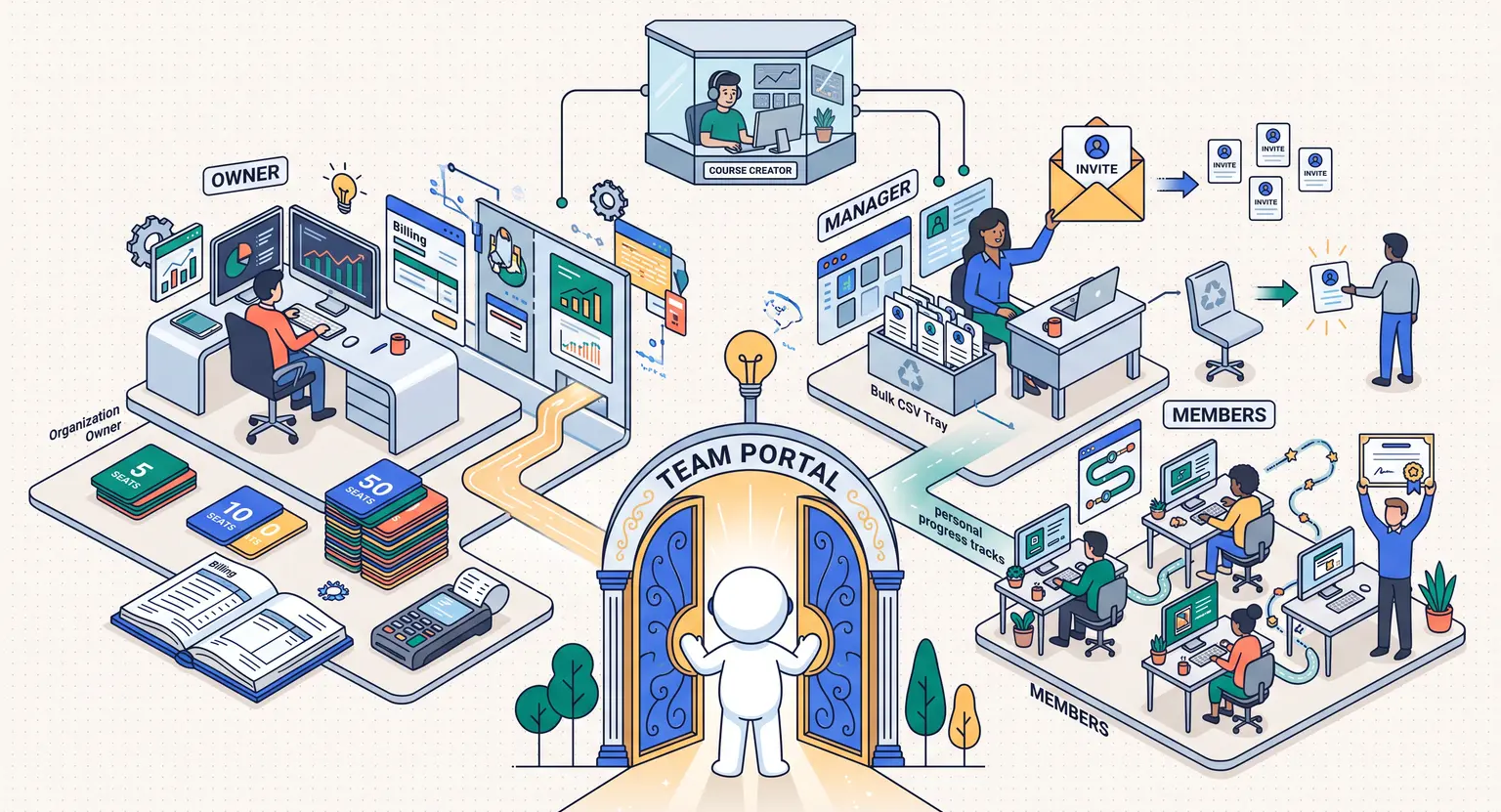
To run corporate learning smoothly, your platform needs a clean structural separation between billing, administration, and learning. Group functionality depends on a clear hierarchy of roles.
1. The Organization Owner and Billing Manager
This is the person holding the corporate credit card or approving purchase orders. They might be a department head, an HR manager, or an external training coordinator.
Often, this buyer never watches a single video lesson. Their primary job is managing seats, inviting staff, reviewing invoices, and evaluating overall team completion.
2. The Group Leader or Team Manager
In larger setups, the financial buyer assigns team leaders to oversee day-to-day progress.
Team managers invite colleagues, revoke access when someone leaves the company, and download completion reports. They need clear visual analytics without full access to administrative billing details.
3. The End Learner (Team Member)
This is the employee who consumes your training. They receive an automated invitation link, set up their personal profile, and work through the curriculum independently. Their notes, quiz submissions, and completion timestamps belong solely to their profile.
4. The Course Creator (Super Admin)
You maintain ultimate control over the environment. You set global course permissions, manage pricing tiers, view cross-organization performance, and jump in to support clients whenever technical questions pop up.
Never lock seat licenses to a specific human permanently. Employee turnover happens constantly. Always allow team managers to revoke a departing employee's access and reassign that open seat to a new hire with a single click.
Four-Step Setup : Building a Frictionless Team Enrollment System
Transitioning from solo enrollments to multi-seat licensing does not require custom coding if you follow a structured rollout plan. Here is how to configure your team access workflow efficiently.
Step 1 : Set Up Seat Tiers and Self-Serve Group Checkout
Remove friction by letting companies purchase seat packages directly on your website.
Configure checkout pages to collect company details, tax identifiers, and the required seat quantity.
Use tiered pricing rules that automatically apply percentage discounts as the seat volume increases : a Starter Team Bundle at 5 seats for small boutique agencies, a Department Tier of 10 to 25 seats with a 15% discount, and an Enterprise Tier of 50+ seats with custom onboarding and dedicated reporting.
Step 2 : Automate Account Creation and Member Invites
Once the transaction clears, your platform should immediately generate a dedicated Organization Portal for the buyer. Avoid sending manual email invites.
The manager should land in a private dashboard where they have three straightforward ways to add their team : direct email invitations, shareable magic join links (a secure, tokenized URL that automatically binds new sign-ups to the company's license bucket), and bulk CSV upload for onboarding larger teams of thirty or more people at once.
Step 3 : Enable Granular Manager Dashboards
Nothing convinces a business to renew like concrete data. Build or enable a clean reporting view inside the manager's portal.
When a manager logs in, they should instantly see who has started the material, current progress percentages, time spent inside modules, and final assessment scores.
Give managers the ability to export these records as CSV or PDF documents for executive reporting and compliance verification.
Step 4 : Establish Seat Reassignment and Offboarding Policies
Decide your rules for seat recycling before you launch.
When an employee leaves a firm, the manager should be able to archive that user. Archiving revokes active access to course materials while preserving their historical completion data.
The empty seat returns to the company's available pool, ready for the next team member. Clear recycling policies prevent awkward customer support tickets and build long-term trust with enterprise buyers.
Comparing Team-Based Access Models
Different business clients need different access structures. Choose the model that best fits your training format and customer base :
| Access model | Best suited for | Billing structure | Primary benefit |
|---|---|---|---|
|
Fixed seat bundles |
Agencies & boutique businesses. |
One-time flat rate per bucket (5, 10, or 20 seats). |
Simple to understand and easy to sell without custom proposals. |
|
Pay-per-seat subscriptions |
Growing tech teams & continuous learning academies. |
Monthly or annual recurring per active user via a clear course pricing strategy. |
Generates highly stable, predictable recurring cash flow. |
|
Enterprise unlimited pass |
Large enterprises with high staff turnover. |
Custom annual contract based on standard enterprise LMS pricing models. |
Eliminates seat-counting friction for buyers with massive departments. |
|
Cohort-based team passes |
Live workshops and intensive bootcamps. |
Fixed price per team per specific start date. |
Fosters internal collaboration and higher live engagement rates. |
Managing Team Engagement and Preventing Inactive Seats
One common challenge with B2B course sales is the "bought-and-forgotten" seat syndrome.
A company purchases twenty seats, but only three employees log in during the first month. If those seats sit idle, the company will not renew when the contract ends.
You can protect client retention by putting proactive engagement safeguards in place :
-
Automated nudge sequences : trigger friendly reminder emails to employees who accept an invitation but fail to start module one within seven days.
-
Monthly executive summaries : send automated digest emails to the team manager highlighting active learners, milestones reached, and overall completion percentages.
-
Milestone celebrations : post shout-outs or certificates when a team member completes a milestone to spark healthy peer motivation across departments.
-
Manager check-in triggers : flag accounts with zero activity after thirty days so your client success team can reach out and offer assistance.
When you help managers keep their teams active, you transform your course from an optional perk into an indispensable training asset.
Explore Related Resources
-
Discover the best practices for structuring courses for corporate student success to ensure high completion rates across enterprise teams.
-
Explore how our best all-in-one course platform handles student analytics, hosting, and funnels in a single workspace.
-
Review all available platform tools to sell online courses to individual and corporate clients.
-
Scale your educational business with our comprehensive all-in-one course ecosystem built for modern digital educators.
Frequently Asked Questions
What is the difference between a team seat and an individual student account?
An individual account is owned and paid for by a single user who controls their own credentials. A team seat belongs to an organization.
A team manager purchases a bucket of seats, assigns them to employees, reclaims seats when staff leave, and reviews progress metrics from a centralized management portal.
Using an LMS for training organizations makes organizing these groups straightforward.
How should I price bulk team licenses compared to single seats?
Most creators offer tiered volume discounts.
Standard setups offer 10% to 15% discounts for small teams of 5 to 10 seats, 20% to 30% for 11 to 50 seats, and custom enterprise quoting with annual minimum commitments for larger groups.
Can team managers view individual quiz scores and completion dates?
Yes. A proper multi-user LMS provides group leaders with dedicated analytics dashboards where they can inspect completion percentages, lesson timestamps, quiz results, and downloadable compliance verification reports.
This is essential when companies launch a customer education academy or internal upskilling program.
What happens to a student's progress if their team license is revoked?
Their learning history, quiz scores, and course records remain stored securely in the database.
If the manager reassigns the seat to another employee, the previous learner loses course access, but their historic completion data stays preserved for corporate audit purposes.





 How to Create a Course Refund Policy (Templates & Best Practices for 2026)
 How to Create a Cohort-Based Online Course (2026 Guide)
 How to Sell an Online Course With a Quiz Funnel (2026 Guide)
 How to Sell an Online Course Through a Sales Call (2026 Guide)