







How to Use AI to Improve an Existing Online Course (2026 Guide)
How to Use AI to Improve an Existing Online Course
Key Takeaways
-
No full rebuild required : upgrading an established curriculum does not require a complete, exhausting rebuild from scratch. You can systematically breathe fresh life into your program using intelligent automation.
-
All in one : deploying an all-in-one platform to sell online courses ensures all your student tracking, files, and automation sync beautifully in one dashboard. Plus, you will save weeks of manual work.
-
Hidden friction : find drops in student engagement and course drop-off points automatically.
-
Speed up production : accelerate the creation of interactive learning components, worksheets, and self-assessments.
-
24/7 support : set up instantaneous assistance tools that resolve student queries around the clock.
-
Refresh and convert : rewrite outdated curriculum units and marketing assets to boost your enrollments.
You poured your heart, soul, and endless hours into building your online course. When you first launched, it was incredible. But time moves fast online…
Student habits shift, technology marches forward, and courses that once felt revolutionary can start gathering virtual dust.
You do not have to throw away your hard work. Honestly, updating your program catalog is far more cost-effective than starting from scratch…
And that is exactly where artificial intelligence shines.
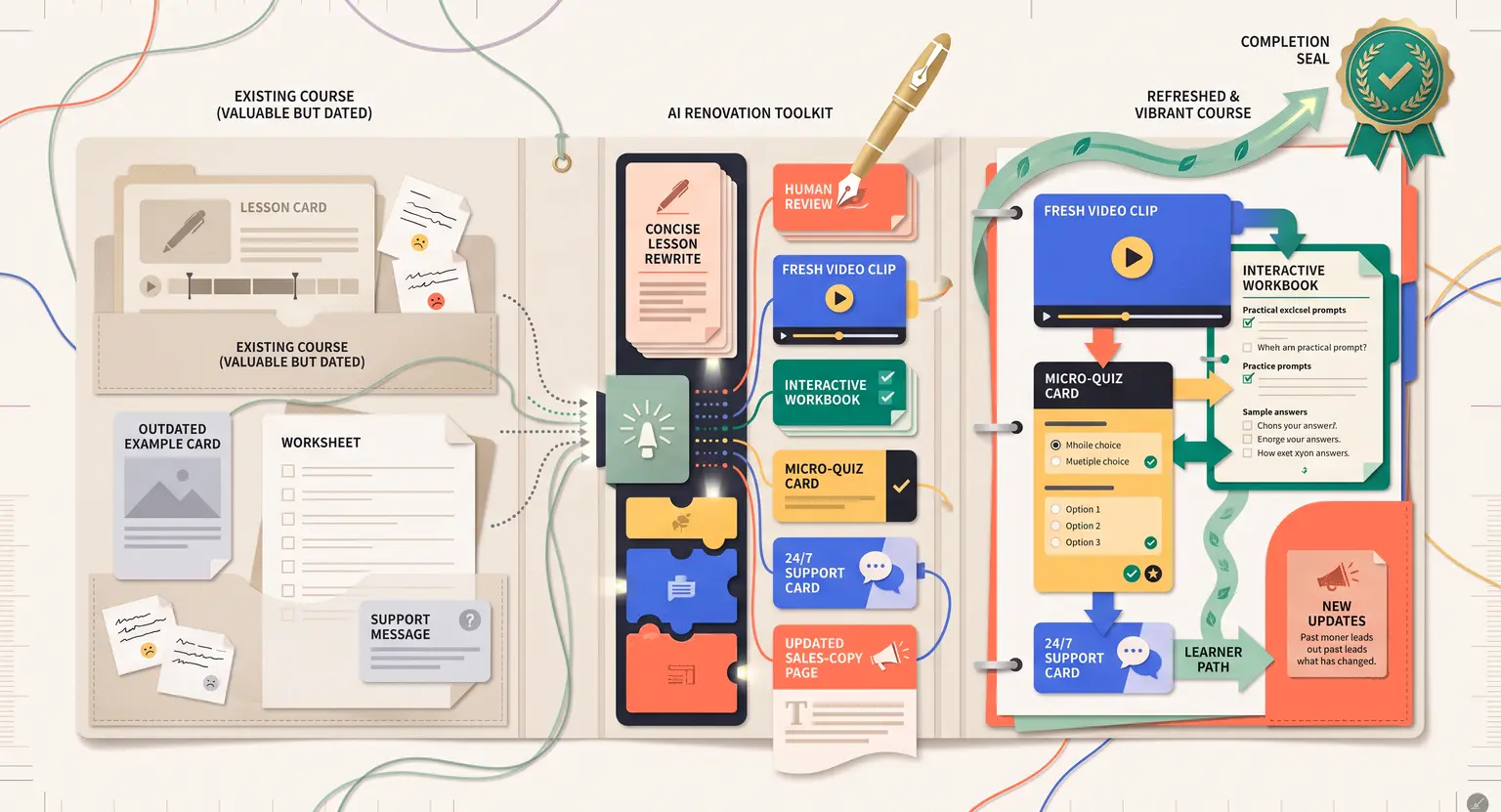
Instead of spending three long, exhausting months re-recording everything from scratch, you can easily use modern tools to find friction points, polish transcripts, and build engaging community elements in days.
Let us walk through the exact blueprint to transform your existing digital course from a dormant asset into a highly active, high-yield modern classroom.
Auditing Your Curriculum to Detect Hidden Gaps
Before you rewrite a single sentence, you need to understand where your course is losing people. Guesswork is expensive.
Historically, we had to manually comb through spreadsheets of student progress, looking at which video lessons were abandoned mid-stream… Now, artificial intelligence handles the heavy lifting of diagnostic evaluation.
By feeding your platform metrics and student exit surveys into an LLM, you can quickly uncover which modules cause learners to log off for good.
This is the absolute fastest way to identify gaps in your online course using AI. You will notice clear patterns. Maybe module three is too dense, or module five lacks a logical next step.
But raw data only tells half the story. You also need to parse what your students say when they do finish.
Think about the dozens of direct messages, community threads, and email inquiries you receive. Processing these manually takes forever. A smart workflow involves running a comprehensive feed of learner reflections through text analysis tools.
Learning how to use AI to analyze student feedback lets you distill hundreds of disparate comments into action items - you get a prioritized list of updates based on actual user struggles.
Here is the kind of raw data you can feed into an analyzer to get immediate clarity :
-
Video analytics reports showing drop-off timestamps across all modules.
-
Raw transcripts of group coaching sessions where students repeatedly asked for clarification.
-
Historical support logs containing technical complaints or content confusion points.
Polishing and Reformatting Outdated Curriculum Units
Now that you know what needs fixing, it is time to revitalize your actual lessons.
Nothing dates a course faster than outdated industry examples, slow-paced speaking, or disorganized slides. You can use semantic engines to polish transcripts, generating fresh, natural scripts for quick re-recordings.
And if you are anxious about appearing on camera, remember you do not always need to upload massive videocasts. Many course upgrades focus on clean, highly readable text, downloadable scripts, or audio-only alternative feeds - AI helps you structure your ideas without losing your authentic human voice.
To keep your material feeling fresh, tell the helper tool to replace historical examples with current trends.
Let us say you run a marketing program. An example from five years ago will feel completely ancient. With a simple prompt, you can swap old references for modern campaigns.
AI acts as an editorial assistant, suggesting better metaphors, refining word choices, and organizing lessons into a logical flow. The result is a course that feels premium, crisp, and incredibly easy to follow. This is crucial for mastering engaging course content creation that students happily recommend to their peers.
Creating Interactive Workbooks and Self-Assessments
A great, modern course is definitely not a passive viewing experience anymore.
Active students want to immediately test their knowledge, track their milestones, and apply what they learn in real-time. Creating support materials used to take weeks of exhaustive design and copywriting work… Today, you can easily whip up high-converting companion resources in minutes.
Start by feeding your lesson transcripts into a prompt window. Ask the tool to generate a set of practical exercises, reflective prompts, and vocabulary sheets based strictly on that text.
This is a game-changer when figuring out how to create a course workbook that feels valuable. Instead of boring, generic questions, you get exercises deeply tied to your specific teachings.
Once the workbook is structured, you can generate interactive checkpoints. Long, text-heavy courses benefit immensely from quick checks of comprehension.
You can find comprehensive tutorials on how to create quizzes for online courses, but the shortcut is letting AI design the actual questions. Ask it to build multiple-choice, true-or-false, or scenario-based questions from your scripts.
It can even generate explanatory text for incorrect answers, giving your students a personalized study loop when they get something wrong.
Here are a few quick upgrades you can add to your student portal using this workflow :
-
Micro-quizzes placed right underneath short video lessons to validate progress.
-
Fill-in-the-blank summaries for quick revision sessions.
-
Step-by-step action guides that turn theoretical concepts into concrete tasks.
Upgrading Classroom Support with Smart Assistive Tech
One major reason frustrated students drop out of online courses is feeling isolated during the process - they hit a technical roadblock, ask a simple question on a quiet, inactive forum, and wait days for a response.
By the time you finally reply, the momentum is completely gone.
They have already moved on.
You can fix this by introducing intelligent mentorship features. Modern system integrations allow you to train custom chat agents specifically on your course videos, PDFs, and past webinar archives.
These AI tutors for online courses act as tireless co-teachers, operating day and night to answer student questions instantly - they point learners to the exact minute of the video lesson that explains their problem.
For general administrative issues, like password resets, billing issues, or course navigation, deploying AI for course customer support ensures your human inbox stays clean. Students get instant, friendly help, and you avoid spending hours answering the same basic questions weekly.
This keeps your online academy running like a well-oiled machine, letting you focus on hosting high-impact webinars or developing brand-new offers.
Streamlining Launch Sequences with Generative Copywriting
Upgrading your interior course materials is really only half the battle. If your digital marketing continues to reflect the old, outdated version of your program, your sales numbers will inevitably remain flat.
You must completely align your public sales pages and overall lead generation sequences with the revamped curriculum.
Fortunately, you do not need to hire an expensive agency to rewrite everything. You can train generative tools to match your brand style, using them to draft persuasive marketing messages.
If you want to boost your conversion rates, rewriting your high-ticket pages using AI for course sales pages is a highly effective tactic. Ask the tool to emphasize your new, modern features, like the immediate personalized feedback loops or the updated templates.
Additionally, your critical marketing warm-up campaigns always need adjusting. Running these highly automated communication sequences keeps potential buyers excited about your refreshed program.
By leveraging email marketing for course creators, you can construct interactive newsletter flows that explain the updates to past leads. Ask your digital assistant to write teaser emails highlighting the specific problems your upgraded curriculum solves.
You might even win back older students who wanted updated solutions.
Choosing Your Upgrades : A Quick-Reference Matrix
To help you prioritize where to apply these advanced techniques first, let us look at the most common areas of friction and how a smart workflow quickly resolves them :
| Course element | Classic manual process | AI-enhanced method | Impact on students |
|---|---|---|---|
|
Student feedback |
Sifting through survey forms individually, grouping responses manually inside a massive spreadsheet. |
Feeding survey text and support transcripts into a summarizer to uncover thematic patterns. |
Quicker adjustments to confusing lessons. |
|
Assessment design |
Writing multiple-choice questions from scratch and manually coding them into your portal system. |
Generating contextual questions directly from lesson transcripts with explanations for wrong answers. |
Instant reinforcement of concepts. |
|
Course support |
Manually answering technical bugs and simple content definitions daily through email. |
Implementing custom responsive assistance agents trained directly on your course library. |
Zero-wait-time answers for active learners. |
|
Copywriting updates |
Spending weeks drafting brand-new sales copy and welcome newsletters by hand. |
Prompting generative writing tools with your persona to create custom sales copy variants quickly. |
Highly relevant and accurate launch materials. |
|
Student workbooks |
Outsourcing design and structured exercise writing to expensive freelance copywriters. |
Crafting tailored action worksheets and review sheets based on internal lesson transcripts. |
Deeper application of material. |
|
Course gamification |
Figuring out complex interactive systems by setting up code or basic static rules. |
Structuring automated milestones and celebratory feedback sequences with localized translation support. |
Boosted completion rates. |
Frequently Asked Questions
Can I update old videos without re-recording my voice?
Yes, absolutely. Voice synthesis tools generate high-quality matches, letting you update confusing old video lessons by simply typing text instead of re-recording entire manual video presentation modules from scratch.
Will active students feel cheated by upgraded system automation?
Never. Learners deeply value speedy technical support and crisp study assets. Integrated digital solutions improve their overall active classroom experience immensely without sacrificing the real human value of your direct and personalized coaching.
How do I make generative text models match my brand tone?
Simply feed the engine high-quality, proven samples of your past newsletters, and write explicit, detailed instructions regarding your desired vocabulary, unique formatting preferences, and negative words to avoid entirely.
Is sensitive student data safe with automated digital systems?
Yes, provided you choose professional systems. Premium online course platforms utilize private, secure API connections that safeguard user metrics, preventing data leakages, protecting proprietary training secrets, and ensuring full compliance.




 How to Create a Course Refund Policy (Templates & Best Practices for 2026)
 How to Run a Beta Version of an Online Course (2026 Guide)
 How to Create a Cohort-Based Online Course (2026 Guide)
 How to Sell an Online Course With a Quiz Funnel (2026 Guide)
 How to Sell an Online Course Through a Sales Call (2026 Guide)